
Factura del contratista
Categoría : Planificadores
Trabajar de forma independiente nunca será tan difícil, al final del trabajo, si necesita enviar una factura, entonces esto es para que lo use.
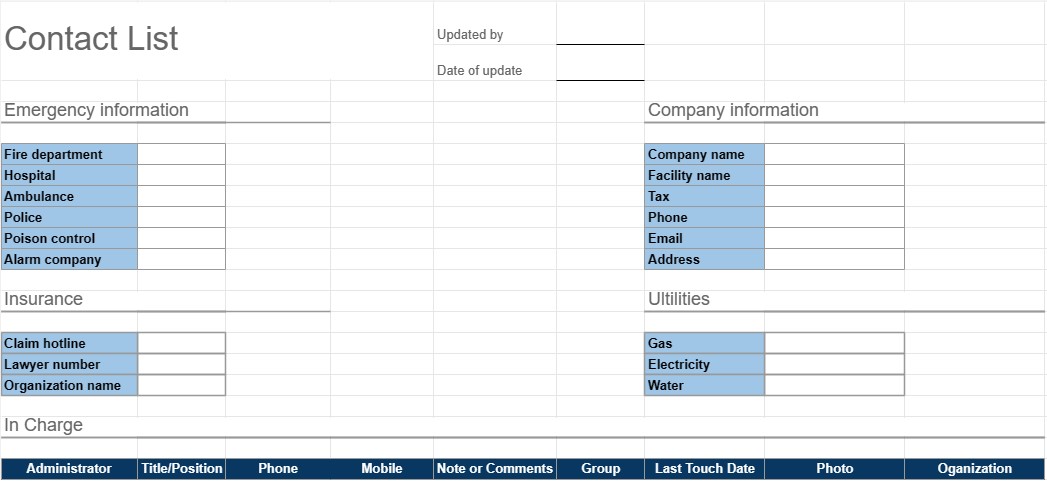
Una plantilla de lista de contactos es una herramienta práctica y organizada que se utiliza para recopilar y administrar información de contacto para individuos o grupos. Se emplea comúnmente para fines personales y profesionales, lo que facilita el acceso y el mantenimiento de una lista completa de contactos. Esta plantilla es particularmente útil para mantenerse conectado, establecer contactos y administrar contactos importantes de manera eficiente.
Componentes clave de una plantilla de lista de contactos:
- Nombre: La plantilla incluye espacio para ingresar el nombre completo de cada contacto. También puede permitir la entrada separada de nombres y apellidos.
- Información de contacto: Esta sección generalmente incluye campos para varios detalles de contacto, que pueden incluir números de teléfono, direcciones de correo electrónico, direcciones físicas y números de fax.
- Organización: Los usuarios pueden anotar la organización o empresa a la que pertenece el contacto. Esto es especialmente útil para contactos comerciales.
- Título/Posición: Para contactos profesionales, se puede agregar el puesto de trabajo o puesto del individuo dentro de la organización.
- Notas o comentarios: Una sección para agregar notas, comentarios o información adicional sobre cada contacto, como la naturaleza de la relación o cualquier detalle específico.
- Categoría o Grupo: Los usuarios pueden categorizar o agrupar contactos según criterios como contactos comerciales, contactos personales, amigos, familiares o proyectos o intereses específicos.
- Foto: Algunas plantillas puede permitir a los usuarios agregar una foto del contacto, lo que facilita el reconocimiento de las personas.
- Fecha de adición/actualización: La fecha en que se agregó el contacto o cuándo se publicó su información por última vez. Las actualizaciones se pueden registrar.
- Clasificación y filtrado: muchas plantillas ofrecen opciones de clasificación y filtrado para organizar los contactos alfabéticamente, por categoría o según otros criterios.
Beneficios de usar una plantilla de lista de contactos:
- Organización: Mantiene toda la información de contacto en una ubicación centralizada, lo que facilita la búsqueda y actualización de detalles a medida. necesario.
- Accesibilidad: Proporciona acceso rápido a detalles de contacto esenciales, lo que reduce el tiempo dedicado a buscar números de teléfono o direcciones de correo electrónico.
- Eficiencia: Agiliza la comunicación y ayuda a los usuarios a mantenerse conectados con colegas, amigos y familiares.
- Redes: Útil para fines de networking, ya que permite a las personas mantener una lista de contactos profesionales y socios comerciales.
- Copia de seguridad: Sirve como una copia de seguridad de la información de contacto importante en caso de pérdida del dispositivo o corrupción de datos.
- Gestión de relaciones: Ayuda a los usuarios a mantener un registro de las relaciones e interacciones con los contactos, lo que puede ser valioso para el seguimiento.
- Personalización: Los usuarios pueden personalizar la plantilla para adaptarla a sus necesidades específicas. y preferencias.
En resumen, una plantilla de lista de contactos es una herramienta práctica para organizar y gestionar la información de contacto de manera eficiente. Ya sea que se utilice con fines personales o profesionales, simplifica el proceso de almacenamiento, acceso y actualización de los datos de contacto, facilitando en última instancia la comunicación y la gestión de relaciones.
Vista previa y descarga sencilla de la plantilla de hoja de cálculo
Vea la versión completa de una plantilla de hoja de cálculo sin limitaciones para ver si le gusta, luego puede descargar la plantilla de Excel para almacenarla en su dispositivo y usarla de forma gratuita.
Acceda a la plantilla de hoja de cálculo desde cualquier lugar
Esto funciona en todos los sistemas operativos populares, como Windows, MacOS, Linux, iOS. Puedes ver las plantillas de hojas de cálculo y descargarlas sin programas adicionales.
Cómo utilizar una plantilla
Descubra cómo obtener una vista previa, descargar y luego usar la plantilla de hoja de cálculo siguiendo los pasos que son extremadamente fáciles de seguir.
Más plantillas similares
Vea más plantillas de hojas de cálculo que se encuentran en la misma categoría que la elegida.













