
Timesheet
Κατηγορία : Ιχνηλάτες
Working timesheet to track the staffs to achieve an overview in regards to what the department is doing in the working hours.
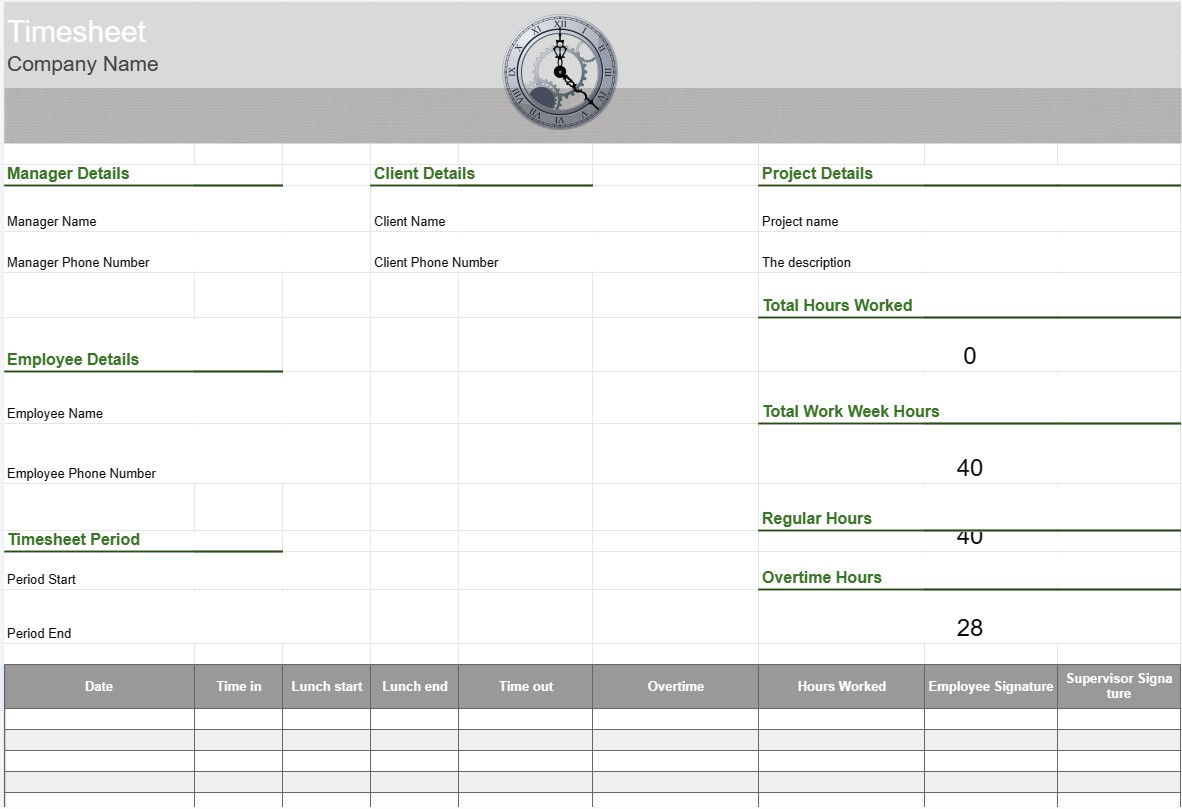
A Timesheet Template is a tool used by employees and organizations to track and record the time spent on various tasks, projects, or assignments. Timesheets are commonly used for tracking working hours, whether for payroll purposes, project management, or monitoring billable hours for clients. Timesheet templates help ensure accurate time tracking and reporting.
Key Components of a Timesheet Template:
- Employee Information: The template includes details about the employee, such as their name, employee ID, department, and contact information.
- Date and Time: A calendar or table format displays dates and times in which employees record their work hours. This can be organized by days, weeks, or months.
- Task/Project Details: Employees enter details about the tasks or projects they are working on. This may include project names, task descriptions, or project codes.
- Time In and Time Out: For each day, employees record the time they started and ended work, as well as any breaks taken during the workday.
- Total Hours: The template calculates the total number of hours worked each day, week, or month based on the time entries.
- Overtime Tracking: If applicable, the template may include sections for tracking overtime hours, including regular overtime, double-time, and any applicable rates.
- Client or Customer: If the work is related to client projects, the template may include a field to specify the client or customer name.
- Approval and Signature: Some timesheets include spaces for employees to sign and supervisors or managers to approve the recorded hours.
- Notes or Comments: Employees can add notes or comments related to specific tasks or time entries, such as explanations for overtime or additional context.
- Week Ending: The timesheet typically indicates the end date of the workweek or reporting period.
Benefits of Using a Timesheet Template:
- Accurate Time Tracking: Ensures that employee work hours are accurately recorded, which is essential for payroll processing, project billing, and compliance with labor laws.
- Project Management: Helps project managers and teams track the time spent on various project tasks, allowing for better project planning and resource allocation.
- Payroll Processing: Simplifies the payroll process by providing a detailed record of employee hours worked, including overtime and time off.
- Client Billing: Facilitates billing clients for billable hours worked, making it easier to invoice accurately.
- Compliance: Assists organizations in complying with labor regulations and employment laws regarding working hours and overtime.
- Performance Analysis: Provides data for analyzing employee productivity and task efficiency.
- Documentation: Serves as a record of work hours, which can be useful for audits, disputes, or future reference.
- Transparency: Promotes transparency in time tracking and work reporting, helping employees and employers maintain trust.
In conclusion, a Timesheet Template is a valuable tool for accurately tracking and documenting employee work hours and tasks. It is essential for various purposes, including payroll processing, project management, client billing, and compliance with labor laws and regulations.
Εύκολη προεπισκόπηση και λήψη προτύπου υπολογιστικού φύλλου
Δείτε την πλήρη έκδοση ενός προτύπου υπολογιστικού φύλλου χωρίς περιορισμούς για να δείτε αν σας αρέσει, στη συνέχεια, μπορείτε να κάνετε λήψη του προτύπου excel για να το αποθηκεύσετε στη συσκευή σας και να το χρησιμοποιήσετε δωρεάν.
Πρόσβαση στο πρότυπο υπολογιστικού φύλλου από οπουδήποτε
Αυτό λειτουργεί σε όλα τα δημοφιλή λειτουργικά συστήματα όπως Windows, MacOS, Linux, iOS. Μπορείτε να δείτε τα πρότυπα υπολογιστικών φύλλων και να τα κατεβάσετε χωρίς πρόσθετα προγράμματα.
Πώς να χρησιμοποιήσετε ένα πρότυπο
Μάθετε πώς να κάνετε προεπισκόπηση, λήψη και, στη συνέχεια, χρήση του προτύπου υπολογιστικού φύλλου ακολουθώντας τα βήματα που είναι εξαιρετικά εύκολο να ακολουθήσετε
Περισσότερα παρόμοια πρότυπα
Δείτε περισσότερα από τα πρότυπα υπολογιστικών φύλλων που ανήκουν στην ίδια κατηγορία με το επιλεγμένο.













