
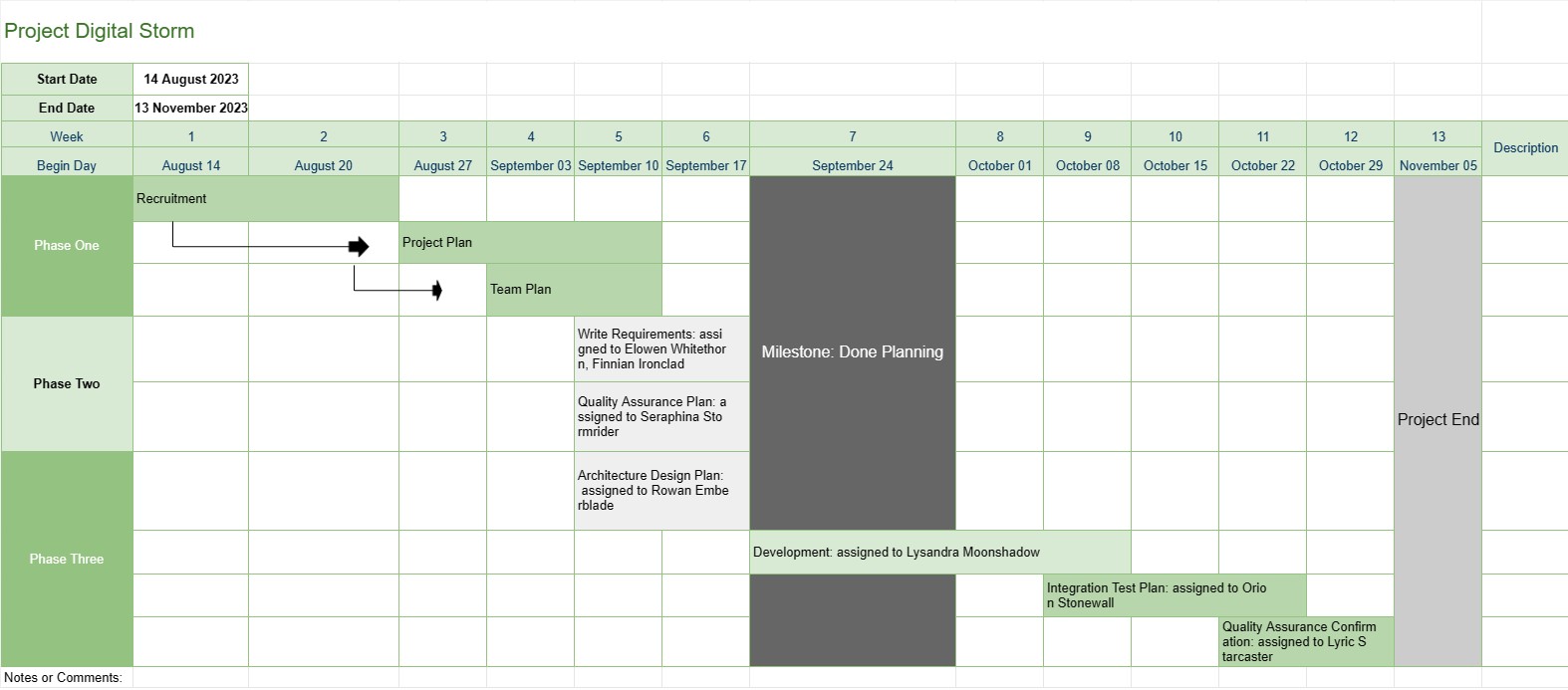
Χρονοδιάγραμμα έργου
Κατηγορία : Ιχνηλάτες
Αυτό παρέχει μια καλύτερη επισκόπηση ενός έργου στον διαχειριστή του έργου, περιλαμβάνει τις φάσεις των εργασιών και την ημερομηνία λήξης ολόκληρης της εξέλιξης της ανάπτυξης, καθώς και όλα τα δεδομένα έχουν οπτικοποιηθεί με εντυπωσιακό τρόπο.
Το πρότυπο χρονοδιάγραμμα έργου είναι ένα βασικό εργαλείο διαχείρισης έργου που παρέχει μια οπτική αναπαράσταση των βασικών ορόσημων, εργασιών και προθεσμιών του έργου για μια καθορισμένη περίοδο. Χρησιμεύει ως οδικός χάρτης για τις ομάδες του έργου και τα ενδιαφερόμενα μέρη, προσφέροντας μια σαφή και συνοπτική επισκόπηση της προόδου και του χρονοδιαγράμματος του έργου.
Ακολουθούν τα βασικά στοιχεία και τα χαρακτηριστικά που περιλαμβάνονται συνήθως σε ένα πρότυπο Χρονολογίου έργου:
- Όνομα έργου: Το πρότυπο ξεκινά με το όνομα ή τον τίτλο του έργου για εύκολη αναγνώριση.
- Διάρκεια έργου: Καθορίζει την έναρξη του έργου. ημερομηνία και ημερομηνία λήξης του έργου, καθορίζοντας το χρονικό πλαίσιο εντός του οποίου θα ολοκληρωθεί το έργο.
- Ορόσημα: Τα ορόσημα είναι σημαντικά γεγονότα ή επιτεύγματα εντός του έργου που σηματοδοτούν σημαντικά σημεία προόδου. Συνήθως αντιπροσωπεύονται ως συγκεκριμένες ημερομηνίες στο χρονοδιάγραμμα και χρησιμεύουν ως σημεία αναφοράς για την παρακολούθηση της εξέλιξης του έργου.
- Εργασίες ή Δραστηριότητες: Το πρότυπο περιγράφει τις διάφορες εργασίες, δραστηριότητες ή φάσεις που εμπλέκονται. στο έργο. Κάθε εργασία σχετίζεται με μια ημερομηνία έναρξης και μια εκτιμώμενη διάρκεια.
- Εξαρτήσεις: Ορισμένα πρότυπα Χρονολογίου έργου περιλαμβάνουν βέλη ή γραμμές που συνδέουν εργασίες για να απεικονίσουν τις εξαρτήσεις εργασιών. Αυτό βοηθά τις ομάδες έργου να κατανοήσουν τη σειρά με την οποία πρέπει να ολοκληρωθούν οι εργασίες.
- Ανατεθέντες πόροι: Οι διαχειριστές έργου μπορούν να υποδείξουν ποια μέλη ομάδας ή πόροι είναι υπεύθυνοι για κάθε εργασία. Αυτό διευκολύνει την κατανομή πόρων και την ανάθεση εργασιών.
- Διάρκεια εργασιών: Η εκτιμώμενη διάρκεια για κάθε εργασία εμφανίζεται συχνά, επιτρέποντας στις ομάδες να μετρήσουν πόσο χρόνο θα διαρκέσει κάθε δραστηριότητα.
- Παρακολούθηση προόδου: Το πρότυπο μπορεί να περιλαμβάνει οπτικούς δείκτες για την παρακολούθηση της ολοκλήρωσης των εργασιών και της συνολικής προόδου του έργου.
- Κρίσιμη διαδρομή: Σε πιο προηγμένο χρονοδιάγραμμα έργου. μπορεί να προσδιοριστεί η κρίσιμη διαδρομή, η οποία αντιπροσωπεύει την ακολουθία εργασιών που καθορίζουν την ελάχιστη διάρκεια του έργου.
- Σημειώσεις ή σχόλια: Οι χρήστες μπορούν να προσθέτουν σημειώσεις, σχόλια ή περιγραφές. για την παροχή πρόσθετου πλαισίου ή λεπτομερειών για συγκεκριμένες εργασίες ή ορόσημα.
Το πρότυπο χρονοδιάγραμμα έργου διαδραματίζει κεντρικό ρόλο στη διαχείριση του έργου παρέχοντας πολλά βασικά οφέλη:
- Οπτικοποίηση: Προσφέρει μια οπτική αναπαράσταση του έργου, διευκολύνοντας τις ομάδες του έργου και τους ενδιαφερόμενους φορείς να κατανοήσουν το εύρος, το χρονοδιάγραμμα και τα βασικά παραδοτέα του έργου.
- Επικοινωνία: Το χρονοδιάγραμμα χρησιμεύει ως εργαλείο επικοινωνίας, επιτρέποντας στους διαχειριστές έργου να μεταφέρουν την πρόοδο και την κατάσταση του έργου στα μέλη της ομάδας, τους πελάτες και τα στελέχη.
- Σχεδιασμός και συντονισμός: Ομάδες έργου. μπορεί να χρησιμοποιήσει το χρονοδιάγραμμα για να σχεδιάσει εργασίες, να κατανείμει πόρους και να συντονίσει δραστηριότητες για να διασφαλίσει ότι το έργο παραμένει σε καλό δρόμο.
- Διαχείριση κινδύνου: Με τον εντοπισμό εξαρτήσεων εργασιών και κρίσιμων διαδρομών, οι διαχειριστές έργου μπορούν διαχειριστείτε προληπτικά τους πιθανούς κινδύνους και τα σημεία συμφόρησης.
- Τεκμηρίωση: Το χρονοδιάγραμμα παρέχει μια ιστορική καταγραφή της εξέλιξης του έργου, βοηθώντας στην ανάλυση και τεκμηρίωση μετά το έργο.
Συνοπτικά, το πρότυπο Project Timeline είναι ένα απαραίτητο εργαλείο διαχείρισης έργου που βελτιώνει τον σχεδιασμό, την εκτέλεση και την παρακολούθηση του έργου. Διασφαλίζει ότι οι ομάδες έργου έχουν σαφή κατανόηση των στόχων του έργου, των χρονοδιαγραμμάτων και των εξαρτήσεων, συμβάλλοντας τελικά στην επιτυχή ολοκλήρωση του έργου.
Εύκολη προεπισκόπηση και λήψη προτύπου υπολογιστικού φύλλου
Δείτε την πλήρη έκδοση ενός προτύπου υπολογιστικού φύλλου χωρίς περιορισμούς για να δείτε αν σας αρέσει, στη συνέχεια, μπορείτε να κάνετε λήψη του προτύπου excel για να το αποθηκεύσετε στη συσκευή σας και να το χρησιμοποιήσετε δωρεάν.
Πρόσβαση στο πρότυπο υπολογιστικού φύλλου από οπουδήποτε
Αυτό λειτουργεί σε όλα τα δημοφιλή λειτουργικά συστήματα όπως Windows, MacOS, Linux, iOS. Μπορείτε να δείτε τα πρότυπα υπολογιστικών φύλλων και να τα κατεβάσετε χωρίς πρόσθετα προγράμματα.
Πώς να χρησιμοποιήσετε ένα πρότυπο
Μάθετε πώς να κάνετε προεπισκόπηση, λήψη και, στη συνέχεια, χρήση του προτύπου υπολογιστικού φύλλου ακολουθώντας τα βήματα που είναι εξαιρετικά εύκολο να ακολουθήσετε
Περισσότερα παρόμοια πρότυπα
Δείτε περισσότερα από τα πρότυπα υπολογιστικών φύλλων που ανήκουν στην ίδια κατηγορία με το επιλεγμένο.














