
Κουτί Αϊζενχάουερ
Κατηγορία : Προγραμματιστές
Αυτό είναι πρότυπο υπολογιστικών φύλλων που προσομοιώνει ένα διάσημο επιστημονικό μοντέλο το οποίο μπορείτε να χρησιμοποιήσετε για το έργο ή τον προσωπικό σας σκοπό.
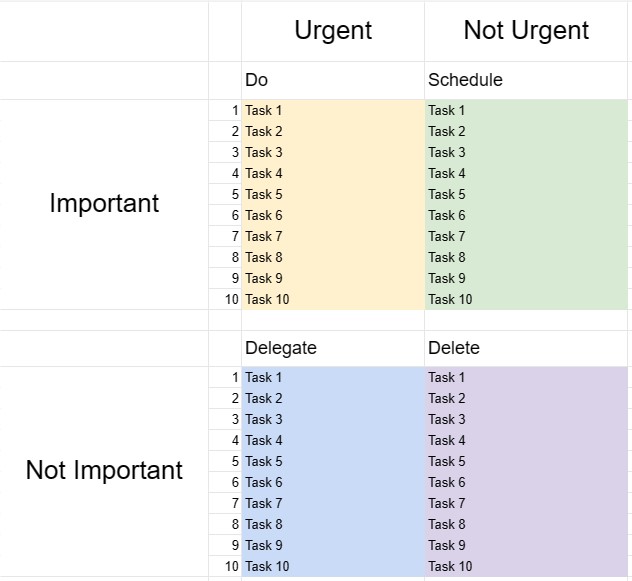
Το κουτί του Αϊζενχάουερ, γνωστό και ως Μήτρα του Αϊζενχάουερ ή Επείγουσα-Σημαντική μήτρα, είναι ένα εργαλείο λήψης αποφάσεων και διαχείρισης χρόνου εμπνευσμένο από ένα απόφθεγμα που αποδίδεται στον Πρόεδρο Ντουάιτ Αϊζενχάουερ: Αυτό που είναι σημαντικό είναι σπάνια επείγον και τι είναι το επείγον είναι σπάνια σημαντικό. Αυτό το πρότυπο έχει σχεδιαστεί για να βοηθά τα άτομα να δίνουν προτεραιότητα στις εργασίες και να λαμβάνουν αποφάσεις σχετικά με τον τρόπο αποτελεσματικής κατανομής του χρόνου και των πόρων τους.
Βασικά στοιχεία ενός προτύπου Eisenhower Box:
- Τέσσερα τεταρτημόρια: Το πρότυπο χωρίζεται σε τέσσερα τεταρτημόρια, το καθένα αντιπροσωπεύει μια διαφορετική κατηγορία εργασιών με βάση τον επείγοντα χαρακτήρα και τη σημασία τους.
- Τεταρτήμα Ι - Επείγον και Σημαντικό: Οι εργασίες σε αυτό το τεταρτημόριο είναι και επείγουσες και σημαντικές. Απαιτούν άμεση προσοχή και πρέπει να αντιμετωπιστούν ως κορυφαία προτεραιότητα.
- Τεταρτήμα II - Όχι επείγουσες αλλά σημαντικές: Οι εργασίες σε αυτό το τεταρτημόριο είναι σημαντικές αλλά όχι επείγουσες. Αντιπροσωπεύουν προληπτικές και μακροπρόθεσμες δραστηριότητες που συμβάλλουν στην προσωπική και επαγγελματική ανάπτυξη και επιτυχία. Ο σχεδιασμός και ο προγραμματισμός αυτών των εργασιών είναι βασικός.
- Τεταρτήμιο III - Επείγον αλλά όχι σημαντικό: Οι εργασίες σε αυτό το τεταρτημόριο είναι επείγουσες αλλά όχι ιδιαίτερα σημαντικές. Μπορεί να περιλαμβάνουν διακοπές, περισπασμούς ή εργασίες που μπορούν να ανατεθούν ή να ελαχιστοποιηθούν για να απελευθερωθεί χρόνος για πιο σημαντικά θέματα.
- Τεταρτήμιο IV - Μη επείγουσα και μη σημαντική: Εργασίες σε αυτό το άρθρο. τεταρτημόριο δεν είναι ούτε επείγον ούτε σημαντικό. Συχνά είναι δραστηριότητες που χάνουν χρόνο και θα πρέπει να ελαχιστοποιηθούν ή να εξαλειφθούν.
- Λίστα εργασιών: Οι χρήστες καταγράφουν τις εργασίες τους στο κατάλληλο τεταρτημόριο με βάση τις εργασίες τους. αξιολόγηση του επείγοντος χαρακτήρα και της σημασίας κάθε εργασίας.
- Σχέδιο δράσης: Για εργασίες στα Τεταρτοταγμένα Ι και ΙΙ, οι χρήστες μπορούν να δημιουργήσουν σχέδια δράσης, να ορίσουν προθεσμίες και να καθορίσουν τα βήματα που απαιτούνται για την ολοκλήρωσή τους .
- Επισκόπηση και ενημέρωση: Η τακτική αναθεώρηση και ενημέρωση του Eisenhower Box βοηθά τα άτομα να παραμείνουν εστιασμένα σε αυτό που πραγματικά έχει σημασία και να προσαρμόσουν τις προτεραιότητές τους όπως απαιτείται.
Οφέλη από τη χρήση προτύπου Eisenhower Box:
- Ρύθμιση προτεραιότητας: Παρέχει ένα δομημένο πλαίσιο για την ιεράρχηση των εργασιών και τη λήψη αποφάσεων σχετικά με το πού θα κατανεμηθεί χρόνος και προσπάθεια.
- Διαχείριση χρόνου: Βοηθά τους χρήστες να επικεντρωθούν σε εργασίες που συμβάλλουν σε μακροπρόθεσμους στόχους και μειώνουν τον χρόνο που αφιερώνουν σε ασήμαντες ή αντιδραστικές δραστηριότητες.
- Παραγωγικότητα: Αυξάνει την παραγωγικότητα δίνοντας έμφαση σε σημαντικές εργασίες και μειώνοντας το χρόνο που χάνεται σε λιγότερο σημαντικές.
- Μείωση του άγχους: Επιτρέπει στους χρήστες να αντιμετωπίζουν επείγοντα ζητήματα αμέσως, ενώ παράλληλα διαθέτουν χρόνο σε σημαντικά αλλά μη. -επείγουσες εργασίες, μειώνοντας το άγχος και την αίσθηση της συνεχούς αντίδρασης σε κρίσεις.
- Επίτευξη Στόχου: Υποστηρίζει την πρόοδο προς τους μακροπρόθεσμους στόχους και την προσωπική ανάπτυξη δίνοντας έμφαση σε σημαντικές εργασίες.
- Αποτελεσματικότητα: Βοηθά τα άτομα να εργάζονται πιο έξυπνα εντοπίζοντας εργασίες που μπορούν να ανατεθούν, να εξαλειφθούν ή να ελαχιστοποιηθούν.
- Ενημέρωση χρόνου: Προωθεί την επίγνωση των πώς ξοδεύεται ο χρόνος και ενθαρρύνει την πιο σκόπιμη χρήση του χρόνου.
Συμπερασματικά, ένα πρότυπο Eisenhower Box είναι ένα πολύτιμο εργαλείο για άτομα που επιδιώκουν να διαχειρίζονται αποτελεσματικά το χρόνο τους, να δίνουν προτεραιότητα στις εργασίες και να λαμβάνουν τεκμηριωμένες αποφάσεις για το πού να επενδύσουν τις προσπάθειές τους. Με την κατηγοριοποίηση των εργασιών με βάση τον επείγοντα χαρακτήρα και τη σημασία τους, οι χρήστες μπορούν να αυξήσουν την παραγωγικότητα, να μειώσουν το άγχος και να εργαστούν για την επίτευξη των στόχων τους πιο αποτελεσματικά.
Εύκολη προεπισκόπηση και λήψη προτύπου υπολογιστικού φύλλου
Δείτε την πλήρη έκδοση ενός προτύπου υπολογιστικού φύλλου χωρίς περιορισμούς για να δείτε αν σας αρέσει, στη συνέχεια, μπορείτε να κάνετε λήψη του προτύπου excel για να το αποθηκεύσετε στη συσκευή σας και να το χρησιμοποιήσετε δωρεάν.
Πρόσβαση στο πρότυπο υπολογιστικού φύλλου από οπουδήποτε
Αυτό λειτουργεί σε όλα τα δημοφιλή λειτουργικά συστήματα όπως Windows, MacOS, Linux, iOS. Μπορείτε να δείτε τα πρότυπα υπολογιστικών φύλλων και να τα κατεβάσετε χωρίς πρόσθετα προγράμματα.
Πώς να χρησιμοποιήσετε ένα πρότυπο
Μάθετε πώς να κάνετε προεπισκόπηση, λήψη και, στη συνέχεια, χρήση του προτύπου υπολογιστικού φύλλου ακολουθώντας τα βήματα που είναι εξαιρετικά εύκολο να ακολουθήσετε
Περισσότερα παρόμοια πρότυπα
Δείτε περισσότερα από τα πρότυπα υπολογιστικών φύλλων που ανήκουν στην ίδια κατηγορία με το επιλεγμένο.













