Εβδομαδιαίο πρόγραμμα εργασίας
Κατηγορία : Ημερολόγια
Εάν πρέπει να γνωρίζετε ακριβώς τι πρέπει να κάνετε κάθε εβδομάδα, πρέπει να το χρησιμοποιήσετε γιατί σας επιτρέπει να γράψετε τις εργασίες.
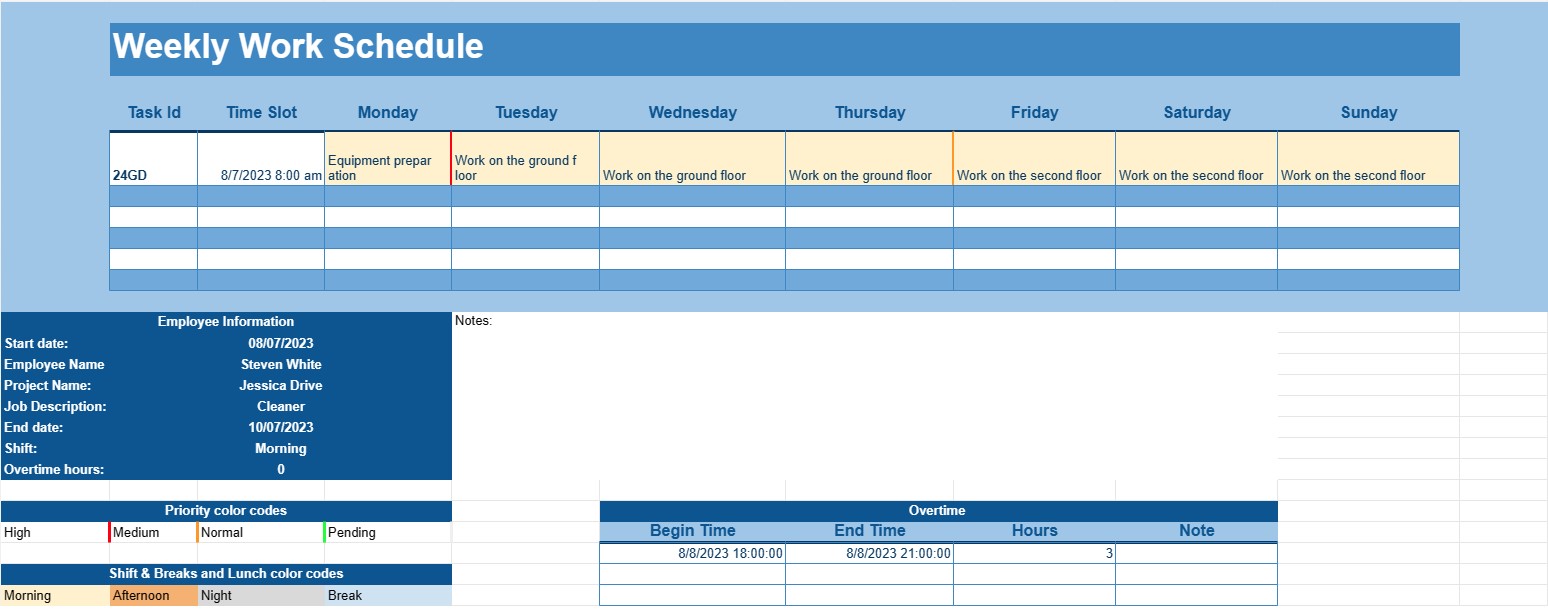
Ένα πρότυπο εβδομαδιαίου χρονοδιαγράμματος εργασίας είναι ένα δομημένο έγγραφο που βοηθά τα άτομα ή τις επιχειρήσεις να σχεδιάσουν και να οργανώσουν τις εργασιακές τους υποχρεώσεις και αναθέσεις για μια συγκεκριμένη εβδομάδα. Αυτό το πρότυπο είναι ένα πολύτιμο εργαλείο για την αποτελεσματική διαχείριση του χρόνου, τη διασφάλιση της αποτελεσματικής κατανομής των εργασιών και την παρακολούθηση των ευθυνών που σχετίζονται με την εργασία.
Βασικά στοιχεία ενός προτύπου εβδομαδιαίου προγράμματος εργασίας:
- Ημέρες και ώρες: Το πρότυπο συνήθως εμφανίζει όλες τις ημέρες της εβδομάδας, ξεκινώντας από Δευτέρα και τελειώνει την Κυριακή. Χωρίζεται σε ώρες ή χρονοθυρίδες, επιτρέποντας στους χρήστες να κατανέμουν εργασίες ή ραντεβού για κάθε μέρα.
- Πληροφορίες εργαζομένων: Για τις επιχειρήσεις, το πρότυπο συχνά περιλαμβάνει ενότητες ή στήλες για να παρατίθενται τα ονόματα των εργαζομένων ή των μελών της ομάδας. Αυτό βοηθά στην ανάθεση εργασιών σε συγκεκριμένα άτομα.
- Εργασία ή εργασία: Οι χρήστες μπορούν να εισάγουν τις λεπτομέρειες των εργασιών ή των εργασιών που πρέπει να ολοκληρωθούν κατά τη διάρκεια της εβδομάδας. Αυτό μπορεί να περιλαμβάνει ονόματα έργων, περιγραφές θέσεων εργασίας ή συγκεκριμένες δραστηριότητες.
- Προτεραιότητα ή προθεσμία: Ορισμένα πρότυπα περιλαμβάνουν μια στήλη προτεραιότητας ή προθεσμίας, επιτρέποντας στους χρήστες να ιεραρχούν εργασίες με βάση τη σημασία τους ή να ορίζουν ημερομηνίες λήξης.
- Βάρδιες: Σε χώρους εργασίας με χρονοδιαγράμματα που βασίζονται σε βάρδιες, το πρότυπο μπορεί να περιλαμβάνει ενότητες για πρωινές, απογευματινές και νυχτερινές βάρδιες, μαζί με εργασίες εργαζομένων για κάθε βάρδια.
- Διαλείμματα και μεσημεριανό γεύμα: Οι χρήστες μπορούν να προγραμματίσουν ώρες διαλειμμάτων και μεσημεριανές περιόδους για να διασφαλίσουν ότι οι εργαζόμενοι έχουν επαρκή ανάπαυση και διαλείμματα γευμάτων κατά τις εργάσιμες ημέρες τους.
- Υπερωρίες: Εάν ισχύει, ενδέχεται να υπάρχει μια ενότητα για την καταγραφή των ωρών υπερωριών που εργάστηκαν από τους εργαζόμενους.
- Σημειώσεις ή σχόλια: Οι χρήστες μπορούν να προσθέτουν σημειώσεις ή σχόλια για να παρέχουν πρόσθετες πληροφορίες ή οδηγίες σχετικά με συγκεκριμένες εργασίες ή εργασίες.
Οφέλη από τη χρήση ενός προτύπου εβδομαδιαίου χρονοδιαγράμματος εργασίας:
- Αποτελεσματική διαχείριση χρόνου: Βοηθά τα άτομα και τις επιχειρήσεις να κατανέμουν αποτελεσματικά χρόνο και πόρους για την τήρηση στόχων και προθεσμιών που σχετίζονται με την εργασία.
- Κατανομή πόρων: Διασφαλίζει ότι οι εργασίες κατανέμονται ομοιόμορφα μεταξύ των εργαζομένων ή των μελών της ομάδας, αποτρέποντας την υπερβολική εργασία ή την υποχρησιμοποίηση των πόρων.
- Οπτικός προγραμματισμός: Προσφέρει μια οπτική αναπαράσταση του προγράμματος της εβδομάδας, διευκολύνοντας τον εντοπισμό πιθανών συγκρούσεων ή επικαλύψεων.
- Βελτιωμένη επικοινωνία: Διευκολύνει την επικοινωνία εντός των ομάδων παρέχοντας ένα κεντρικό πρόγραμμα στο οποίο μπορούν να έχουν πρόσβαση και να ανατρέξουν όλοι.
- Βελτιωμένη παραγωγικότητα: Επιτρέπει στα άτομα να εστιάζουν σε εργασίες χωρίς την ανάγκη συνεχούς προγραμματισμού και επαναπρογραμματισμού.
- Ευελιξία: Επιτρέπει προσαρμογές στο χρονοδιάγραμμα όπως απαιτείται για την προσαρμογή των μεταβαλλόμενων προτεραιοτήτων ή των απροσδόκητων συμβάντων.
- Συμμόρφωση: Σε ορισμένους κλάδους, η ύπαρξη ενός καλά τεκμηριωμένου προγράμματος εργασίας είναι απαραίτητη για τη συμμόρφωση με τους εργατικούς νόμους και κανονισμούς.
Συμπερασματικά, ένα Πρότυπο Εβδομαδιαίου Προγράμματος Εργασίας είναι ένα ανεκτίμητο εργαλείο για επιχειρήσεις, διευθυντές και άτομα που επιδιώκουν να διατηρήσουν μια οργανωμένη και αποτελεσματική προσέγγιση στις εβδομαδιαίες εργασιακές τους υποχρεώσεις. Βοηθά στη διαχείριση του χρόνου, την κατανομή των πόρων και την αποτελεσματική επικοινωνία εντός των ομάδων, οδηγώντας τελικά σε βελτιωμένη παραγωγικότητα και καλύτερη ισορροπία μεταξύ εργασίας και προσωπικής ζωής. Είτε χρησιμοποιείται σε εταιρικό περιβάλλον είτε για προσωπική διαχείριση χρόνου, αυτό το πρότυπο είναι μια πρακτική λύση για τον προγραμματισμό και την οργάνωση εβδομαδιαίων εργασιών και ευθυνών.
Εύκολη προεπισκόπηση και λήψη προτύπου υπολογιστικού φύλλου
Δείτε την πλήρη έκδοση ενός προτύπου υπολογιστικού φύλλου χωρίς περιορισμούς για να δείτε αν σας αρέσει, στη συνέχεια, μπορείτε να κάνετε λήψη του προτύπου excel για να το αποθηκεύσετε στη συσκευή σας και να το χρησιμοποιήσετε δωρεάν.
Πρόσβαση στο πρότυπο υπολογιστικού φύλλου από οπουδήποτε
Αυτό λειτουργεί σε όλα τα δημοφιλή λειτουργικά συστήματα όπως Windows, MacOS, Linux, iOS. Μπορείτε να δείτε τα πρότυπα υπολογιστικών φύλλων και να τα κατεβάσετε χωρίς πρόσθετα προγράμματα.
Πώς να χρησιμοποιήσετε ένα πρότυπο
Μάθετε πώς να κάνετε προεπισκόπηση, λήψη και, στη συνέχεια, χρήση του προτύπου υπολογιστικού φύλλου ακολουθώντας τα βήματα που είναι εξαιρετικά εύκολο να ακολουθήσετε
Περισσότερα παρόμοια πρότυπα
Δείτε περισσότερα από τα πρότυπα υπολογιστικών φύλλων που ανήκουν στην ίδια κατηγορία με το επιλεγμένο.