Ημερολόγιο ραντεβού
Κατηγορία : Ημερολόγια
Το καθημερινό σας πρόγραμμα θα είναι πιο ξεκάθαρο αν το χρησιμοποιήσετε για να επισημάνετε όλα τα ραντεβού της ημέρας.
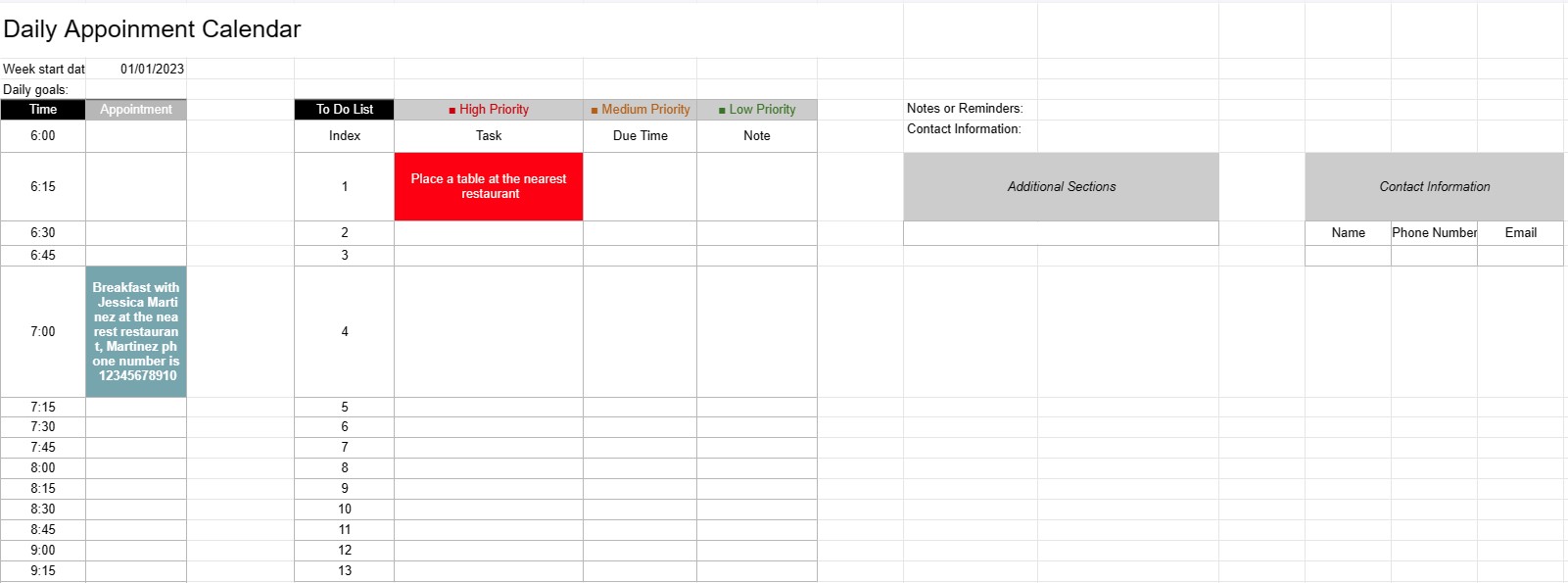
Το πρότυπο ημερολογίου ημερήσιων συναντήσεων είναι ένα εργαλείο προγραμματισμού που χρησιμοποιείται από άτομα, επαγγελματίες και επιχειρήσεις για τον προγραμματισμό και τη διαχείριση των καθημερινών συναντήσεων, συναντήσεων και εργασιών τους. Παρέχει μια δομημένη διάταξη για την οργάνωση καθημερινών δραστηριοτήτων, τον καθορισμό προτεραιοτήτων και τη διασφάλιση της αποτελεσματικής κατανομής του χρόνου.
Βασικά στοιχεία ενός προτύπου ημερολογίου ημερήσιων συναντήσεων:
- Ημερομηνία: Το πρότυπο εμφανίζει συνήθως την ημερομηνία στο επάνω μέρος κάθε ημερήσιας σελίδας, επιτρέποντας στους χρήστες να πλοηγούνται σε διαφορετικές ημέρες.
- Χρονοδοχεία: Η ημέρα χωρίζεται σε χρονοθυρίδες ή ώρες, που συνήθως ξεκινούν το πρωί και τελειώνουν το βράδυ. Κάθε χρονοθυρίδα αντιπροσωπεύει μια συγκεκριμένη περίοδο κατά τη διάρκεια της ημέρας.
- Λεπτομέρειες ραντεβού: Οι χρήστες μπορούν να εισαγάγουν λεπτομέρειες ραντεβού σε κάθε χρονική περίοδο, συμπεριλαμβανομένων των εξής:
- Ώρα ραντεβού
- Τίτλος ή περιγραφή του ραντεβού
- Τοποθεσία ή αίθουσα συσκέψεων
- Στοιχεία επικοινωνίας των εμπλεκομένων ατόμων
- Λίστα υποχρεώσεων: Ορισμένα πρότυπα περιλαμβάνουν μια ενότητα για την καταχώριση εργασιών ή στοιχείων υποχρεώσεων που πρέπει να ολοκληρωθούν κατά τη διάρκεια της ημέρας. Αυτά μπορούν να κατηγοριοποιηθούν βάσει προτεραιότητας ή χρόνου.
- Σημειώσεις ή υπενθυμίσεις: Ένας χώρος για γενικές σημειώσεις ή υπενθυμίσεις μπορεί να παρέχεται στο κάτω μέρος της σελίδας.
- Προτεραιότητες ή στόχοι: Ορισμένα πρότυπα μπορεί να περιλαμβάνουν μια ενότητα για τον καθορισμό ημερήσιων προτεραιοτήτων ή στόχων, βοηθώντας τους χρήστες να παραμείνουν συγκεντρωμένοι σε βασικές εργασίες.
- Στοιχεία επικοινωνίας: Τα στοιχεία επικοινωνίας για σημαντικά άτομα ή πελάτες ενδέχεται να περιλαμβάνονται για γρήγορη αναφορά.
- Πρόσθετες ενότητες: Ανάλογα με το πρότυπο, ενδέχεται να υπάρχουν πρόσθετες ενότητες για έξοδα παρακολούθησης, χιλιόμετρα ή άλλες συγκεκριμένες πληροφορίες. να συμπεριληφθεί.
Οφέλη από τη χρήση προτύπου ημερολογίου ημερήσιων ραντεβού:
- Διαχείριση χρόνου: Βοηθά τους χρήστες να κατανέμουν αποτελεσματικά τον χρόνο τους με προγραμματισμός ραντεβού και εργασιών.
- Οργάνωση: Παρέχει έναν δομημένο τρόπο παρακολούθησης των καθημερινών δεσμεύσεων, μειώνοντας τον κίνδυνο υπερκράτησης ή απώλειας ραντεβού.
- Προτεραιότητα: Επιτρέπει στους χρήστες να δίνουν προτεραιότητα σε εργασίες και συναντήσεις, διασφαλίζοντας ότι τα πιο σημαντικά θέματα αντιμετωπίζονται πρώτα.
- Παραγωγικότητα: Διευκολύνει την καλύτερη διαχείριση του χρόνου και την αυξημένη παραγωγικότητα παρέχοντας την υπηρεσία. μια οπτική επισκόπηση των δραστηριοτήτων της ημέρας.
- Επικοινωνία: Διασφαλίζει ότι οι χρήστες είναι καλά προετοιμασμένοι για συναντήσεις και ραντεβού, έχοντας όλες τις σχετικές πληροφορίες στα χέρια τους.
- Παρακολούθηση χρόνου: Μπορεί να χρησιμοποιηθεί για την παρακολούθηση χρεώσιμων ωρών για επαγγελματίες που χρεώνουν ανά ώρα.
- Αναφορά: Χρησιμεύει ως σημείο αναφοράς για τον έλεγχο του παρελθόντος. ραντεβού και εργασίες.
- Αποτελεσματικότητα: Βελτιώνει την αποδοτικότητα μειώνοντας τον χρόνο που σπαταλάτε σε αποδιοργανωμένο προγραμματισμό και προγραμματισμό.
Σε συμπέρασμα, ένα Ημερολόγιο Ημερήσιων Ραντεβού. Το πρότυπο είναι ένα πολύτιμο εργαλείο για την αποτελεσματική διαχείριση καθημερινών προγραμμάτων, συναντήσεων και εργασιών. Βοηθά άτομα και επαγγελματίες να παραμείνουν οργανωμένοι, να δώσουν προτεραιότητα στις δραστηριότητές τους και να αξιοποιήσουν στο έπακρο τον χρόνο τους.
Εύκολη προεπισκόπηση και λήψη προτύπου υπολογιστικού φύλλου
Δείτε την πλήρη έκδοση ενός προτύπου υπολογιστικού φύλλου χωρίς περιορισμούς για να δείτε αν σας αρέσει, στη συνέχεια, μπορείτε να κάνετε λήψη του προτύπου excel για να το αποθηκεύσετε στη συσκευή σας και να το χρησιμοποιήσετε δωρεάν.
Πρόσβαση στο πρότυπο υπολογιστικού φύλλου από οπουδήποτε
Αυτό λειτουργεί σε όλα τα δημοφιλή λειτουργικά συστήματα όπως Windows, MacOS, Linux, iOS. Μπορείτε να δείτε τα πρότυπα υπολογιστικών φύλλων και να τα κατεβάσετε χωρίς πρόσθετα προγράμματα.
Πώς να χρησιμοποιήσετε ένα πρότυπο
Μάθετε πώς να κάνετε προεπισκόπηση, λήψη και, στη συνέχεια, χρήση του προτύπου υπολογιστικού φύλλου ακολουθώντας τα βήματα που είναι εξαιρετικά εύκολο να ακολουθήσετε
Περισσότερα παρόμοια πρότυπα
Δείτε περισσότερα από τα πρότυπα υπολογιστικών φύλλων που ανήκουν στην ίδια κατηγορία με το επιλεγμένο.