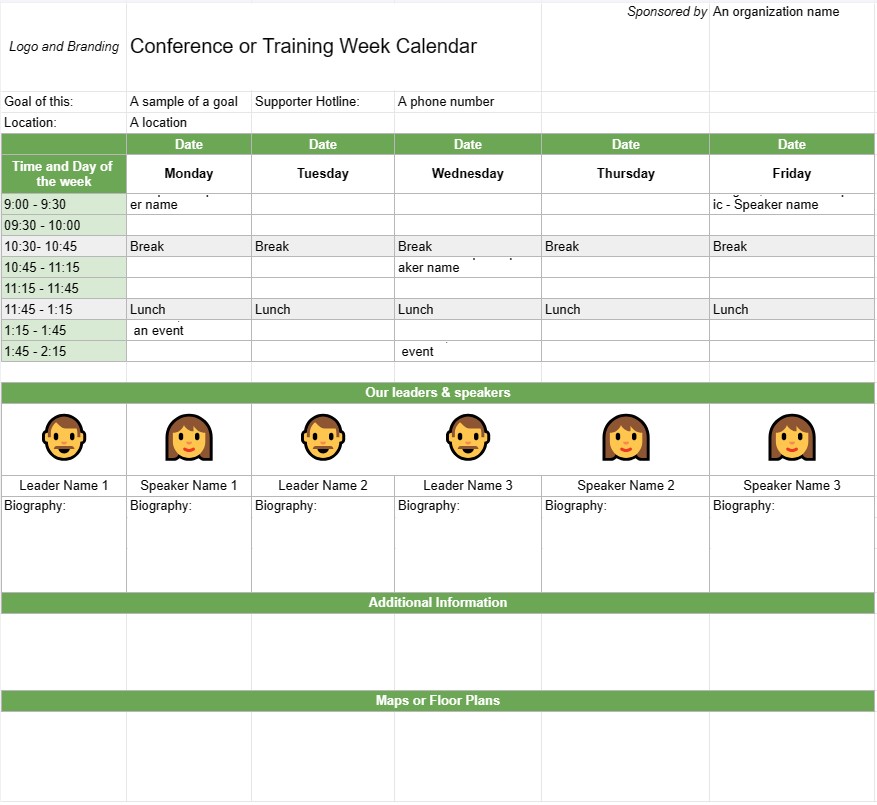
Ημερολόγιο Συνεδρίων ή Εκπαιδευτικής Εβδομάδας
Κατηγορία : Ημερολόγια
Έχετε πολλές συναντήσεις και ατζέντα, πώς μπορείτε να τα καταφέρετε όλα; Εδώ ξεκινά αυτό το πρότυπο υπολογιστικού φύλλου και μπορείτε να το χρησιμοποιήσετε για να διαχειριστείτε την περίοδο.
Το πρότυπο Ημερολογίου Εβδομάδας Συνεδρίων ή Εκπαίδευσης είναι ένα εργαλείο προγραμματισμού που χρησιμοποιείται από οργανισμούς και σχεδιαστές εκδηλώσεων για τον προγραμματισμό και τη διοργάνωση συνεδρίων, εκπαιδευτικών συνεδριών ή εργαστηρίων που διαρκούν πολλές ημέρες ή μια ολόκληρη εβδομάδα. Βοηθά στην περιγραφή της καθημερινής ατζέντας της εκδήλωσης, συμπεριλαμβανομένων θεμάτων συνεδρίας, ομιλητών, τοποθεσιών και άλλων σχετικών λεπτομερειών. Αυτό το πρότυπο διασφαλίζει ότι όλοι οι συμμετέχοντες είναι καλά ενημερωμένοι σχετικά με το πρόγραμμα και τα logistics της εκδήλωσης.
Βασικά στοιχεία ενός προτύπου ημερολογίου συνεδρίου ή εκπαιδευτικής εβδομάδας:
- Τίτλος εκδήλωσης. : Το πρότυπο περιλαμβάνει συνήθως το όνομα του συνεδρίου ή της εκπαιδευτικής εκδήλωσης στο επάνω μέρος.
- Εύρος ημερομηνιών: Καθορίζει τις ημερομηνίες έναρξης και λήξης του συνεδρίου ή της εβδομάδας εκπαίδευσης. .
- Τοποθεσία: Παρέχει πληροφορίες σχετικά με τον τόπο ή τους χώρους διεξαγωγής της εκδήλωσης, συμπεριλαμβανομένων των διευθύνσεων και των ονομάτων των αιθουσών.
- Ημερήσια ατζέντα:Κάθε καθεμία. Η ημέρα της εκδήλωσης περιγράφεται με λεπτομέρειες όπως:
- Ημερομηνία και ημέρα της εβδομάδας
- Πρόγραμμα συνεδριών, εργαστηρίων ή δραστηριοτήτων
- Ώρες έναρξης και λήξης για κάθε συνεδρία
- Τίτλοι, θέματα ή θέματα συνεδρίας
- Ονόματα ομιλητών, εκπαιδευτών ή συντονιστών
- Αναθέσεις αίθουσας ή τοποθεσίας
- Διαλείμματα και ώρες γεύματος
- Ειδικές εκδηλώσεις ή ευκαιρίες δικτύωσης
- Περιγραφές συνεδρίας:Παρέχει σύντομες περιγραφές ή στόχους για κάθε συνεδρία ή εργαστήριο , βοηθώντας τους συμμετέχοντες να κατανοήσουν το περιεχόμενο και τον σκοπό.
- Speaker Bios: Περιλαμβάνει βιογραφικές πληροφορίες για τους ομιλητές ή τους εκπαιδευτές, τονίζοντας την τεχνογνωσία και τα προσόντα τους.
- Πρόσθετες πληροφορίες: Αυτή η ενότητα μπορεί να περιλαμβάνει λεπτομέρειες σχετικά με την εγγραφή, τις διαδικασίες check-in, στοιχεία επικοινωνίας για τους διοργανωτές εκδηλώσεων και αριθμούς επικοινωνίας έκτακτης ανάγκης.
- Χάρτες ή κατόψεις: Εάν είναι απαραίτητο, το πρότυπο μπορεί να περιλαμβάνει χάρτες ή κατόψεις των χώρων της εκδήλωσης για να βοηθήσει τους συμμετέχοντες να πλοηγηθούν στην τοποθεσία.
- Λογότυπο και επωνυμία: Ενσωματώνει το λογότυπο της εκδήλωσης, την επωνυμία της εκδήλωσης. , ή θέμα για τη διατήρηση της συνέπειας και της αναγνώρισης.
Οφέλη από τη χρήση προτύπου ημερολογίου συνεδρίων ή εκπαιδευτικών εβδομάδων:
- Οργάνωση: Βοηθά τους διοργανωτές να προγραμματίσουν και να δομή πολυήμερων εκδηλώσεων με σαφήνεια και αποτελεσματικότητα.
- Επικοινωνία: Παρέχει ένα λεπτομερές πρόγραμμα για τους συμμετέχοντες, τους ομιλητές και το προσωπικό, διασφαλίζοντας ότι όλοι βρίσκονται στην ίδια σελίδα.
- Αποτελεσματικότητα: Μειώνει τη σύγχυση και τις υλικοτεχνικές προκλήσεις περιγράφοντας με σαφήνεια την καθημερινή ατζέντα της εκδήλωσης.
- Κατανομή πόρων: Διασφαλίζει ότι οι αίθουσες, ο εξοπλισμός και Το υλικό κατανέμεται σωστά για κάθε συνεδρία ή εργαστήριο.
- Δέσμευση Συμμετεχόντων: Επιτρέπει στους συμμετέχοντες να προγραμματίσουν την παρουσία τους και να επιλέξουν συνεδρίες που τους ενδιαφέρουν εκ των προτέρων.
- Επαγγελματισμός: Ενισχύει τον επαγγελματισμό της εκδήλωσης παρουσιάζοντας ένα καλά οργανωμένο και οπτικά ελκυστικό πρόγραμμα.
- Δικτύωση: Βοηθά τους συμμετέχοντες να εντοπίσουν ευκαιρίες δικτύωσης και κοινωνικές εκδηλώσεις κατά τη διάρκεια του συνέδριο ή εβδομάδα εκπαίδευσης.
- Αναφορά: Χρησιμεύει ως έγγραφο αναφοράς για να ανατρέξουν οι συμμετέχοντες κατά τη διάρκεια της εκδήλωσης.
Συμπερασματικά, ένα Το Πρότυπο Ημερολογίου Εβδομάδας Συνεδρίων ή Εκπαίδευσης είναι ένα απαραίτητο εργαλείο για τον προγραμματισμό και την εκτέλεση πολυήμερων εκδηλώσεων. Παρέχει ένα δομημένο και οργανωμένο χρονοδιάγραμμα, επιτρέποντας στους συμμετέχοντες να αξιοποιήσουν στο έπακρο την εμπειρία τους και διασφαλίζοντας την ομαλή λειτουργία της εφοδιαστικής εκδήλωσης.
Εύκολη προεπισκόπηση και λήψη προτύπου υπολογιστικού φύλλου
Δείτε την πλήρη έκδοση ενός προτύπου υπολογιστικού φύλλου χωρίς περιορισμούς για να δείτε αν σας αρέσει, στη συνέχεια, μπορείτε να κάνετε λήψη του προτύπου excel για να το αποθηκεύσετε στη συσκευή σας και να το χρησιμοποιήσετε δωρεάν.
Πρόσβαση στο πρότυπο υπολογιστικού φύλλου από οπουδήποτε
Αυτό λειτουργεί σε όλα τα δημοφιλή λειτουργικά συστήματα όπως Windows, MacOS, Linux, iOS. Μπορείτε να δείτε τα πρότυπα υπολογιστικών φύλλων και να τα κατεβάσετε χωρίς πρόσθετα προγράμματα.
Πώς να χρησιμοποιήσετε ένα πρότυπο
Μάθετε πώς να κάνετε προεπισκόπηση, λήψη και, στη συνέχεια, χρήση του προτύπου υπολογιστικού φύλλου ακολουθώντας τα βήματα που είναι εξαιρετικά εύκολο να ακολουθήσετε
Περισσότερα παρόμοια πρότυπα
Δείτε περισσότερα από τα πρότυπα υπολογιστικών φύλλων που ανήκουν στην ίδια κατηγορία με το επιλεγμένο.