
Einfache Inventarliste
Kategorie : Tracker
Notieren Sie alle Namen und Beschreibungen Ihres Inventars, damit Sie sie an einem Ort sehen können.


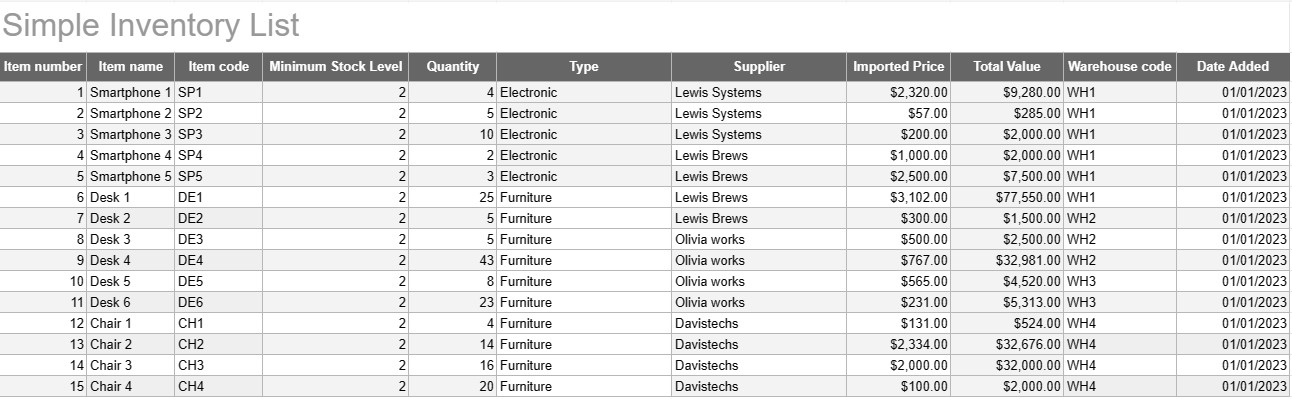
Eine einfache Vorlage für eine Inventarliste ist ein einfaches, aber effektives Tool, mit dem Einzelpersonen und Unternehmen ihren Waren-, Produkt- oder Vermögensbestand verfolgen und verwalten können. Diese Vorlage bietet ein strukturiertes Format zum Aufzeichnen von Artikeldetails, Mengen, Standorten und anderen relevanten Informationen, wodurch die Überwachung der Lagerbestände erleichtert und eine effiziente Verwaltung ermöglicht wird.
Hauptkomponenten einer einfachen Vorlage für eine Bestandsliste:
- Artikeldetails: Die Vorlage enthält Spalten oder Abschnitte für artikelspezifische Informationen, wie z. B. Artikelname, Beschreibung, eindeutige Kennung (z. B. SKU oder Seriennummer) und eventuelle zusätzliche Anmerkungen.
- Menge: Benutzer können die Menge oder Einheiten jedes Artikels auf Lager erfassen. Diese Spalte ist für die genaue Verfolgung der Lagerbestände unerlässlich.
- Standort: Für Unternehmen mit mehreren Lagerstandorten oder Lagern kann die Vorlage eine Spalte enthalten, um den physischen Standort jedes Artikels anzugeben. Dies trägt dazu bei, die Rückholung und Wiederauffüllung zu optimieren.
- Stückpreis: Benutzer können den Stückpreis oder die Kosten für jeden Artikel eingeben. Diese Informationen sind für die Berechnung des Gesamtwerts des Inventars wertvoll.
- Gesamtwert: Einige Vorlagen berechnen automatisch den Gesamtwert jedes Artikels basierend auf der Menge und dem Stückpreis. Dies ermöglicht einen schnellen Überblick über den Gesamtwert des Inventars.
- Datum der Hinzufügung/Aktualisierung: Um Änderungen und Aktualisierungen des Inventars zu verfolgen, können Benutzer das Datum aufzeichnen, an dem jeder Artikel hinzugefügt oder geändert wurde.
- Kategorie/Typ: Artikel können zur besseren Organisation und Berichterstattung in verschiedene Gruppen oder Typen (z. B. Elektronik, Bürobedarf, Kleidung) kategorisiert werden.
- Mindestbestand: Benutzer können für jeden Artikel einen Mindestbestand festlegen. Wenn die Menge unter dieses Niveau fällt, dient dies als Auslöser für eine Nachbestellung oder Wiederauffüllung des Artikels.
- Lieferanteninformationen: In einer Geschäftsumgebung können Benutzer Lieferantendetails wie den Namen des Lieferanten, Kontaktinformationen und Informationen zur Nachbestellung angeben.
Vorteile der Verwendung einer einfachen Bestandslistenvorlage:
- Bestandsverfolgung: Bietet eine klare, aktuelle Momentaufnahme der Lagerbestände und trägt so zur Vermeidung von Fehlbeständen und Überbeständen bei.
- Kostenkontrolle: Ermöglicht Unternehmen, den Wert ihres Lagerbestands zu überwachen und fundierte Entscheidungen über die Wiederauffüllung und den Einkauf zu treffen.
- Effizienz: Optimiert die Bestandsverwaltung, indem Informationen zentralisiert und leicht zugänglich gemacht werden.
- Datengenauigkeit: Reduziert das Risiko von Fehlern bei der Bestandsverfolgung, da alle Informationen systematisch erfasst werden.
- Auftragsverwaltung: Hilft bei der Identifizierung, wann und bei welchen Lieferanten Artikel nachbestellt werden müssen, und verbessert so das Lieferkettenmanagement.
- Compliance: In einigen Branchen ist die Führung genauer Bestandsaufzeichnungen für die Einhaltung gesetzlicher Vorschriften und die Finanzberichterstattung unerlässlich.
- Ressourcenoptimierung: Ermöglicht Unternehmen eine effektivere Ressourcenzuteilung und eine Reduzierung der Transportkosten.
Zusammenfassend lässt sich sagen, dass eine einfache Vorlage für eine Inventarliste ein praktisches Werkzeug für Privatpersonen und Unternehmen ist, die eine organisierte und genaue Aufzeichnung ihres Inventars führen möchten. Ganz gleich, ob Sie es für eine kleine Hausinventur oder als Teil eines größeren Geschäftsbetriebs verwenden: Diese Vorlage vereinfacht die Bestandsverwaltung, verringert das Risiko von Engpässen oder Überbeständen und trägt zu einer besseren Finanzkontrolle und Entscheidungsfindung bei.
Einfache Vorschau und Download der Tabellenvorlage
Sehen Sie sich die Vollversion einer Tabellenkalkulationsvorlage ohne Einschränkungen an, um zu sehen, ob sie Ihnen gefällt. Anschließend können Sie die Excel-Vorlage herunterladen, sie auf Ihrem Gerät speichern und kostenlos verwenden.
Greifen Sie von überall auf die Tabellenvorlage zu
Dies funktioniert auf allen gängigen Betriebssystemen wie Windows, MacOS, Linux, iOS. Sie können die Tabellenvorlagen ansehen und ohne zusätzliche Programme herunterladen.
So verwenden Sie eine Vorlage
Finden Sie heraus, wie Sie die Tabellenvorlage in der Vorschau anzeigen, herunterladen und dann verwenden können, indem Sie die Schritte befolgen, die äußerst einfach zu befolgen sind
Weitere ähnliche Vorlagen
Sehen Sie sich weitere Tabellenvorlagen an, die zur gleichen Kategorie gehören wie die ausgewählte.













