
Recruitment
Kategorie : Planer
Organization usually use this to inform the potential candidate in regards to an opportunity.
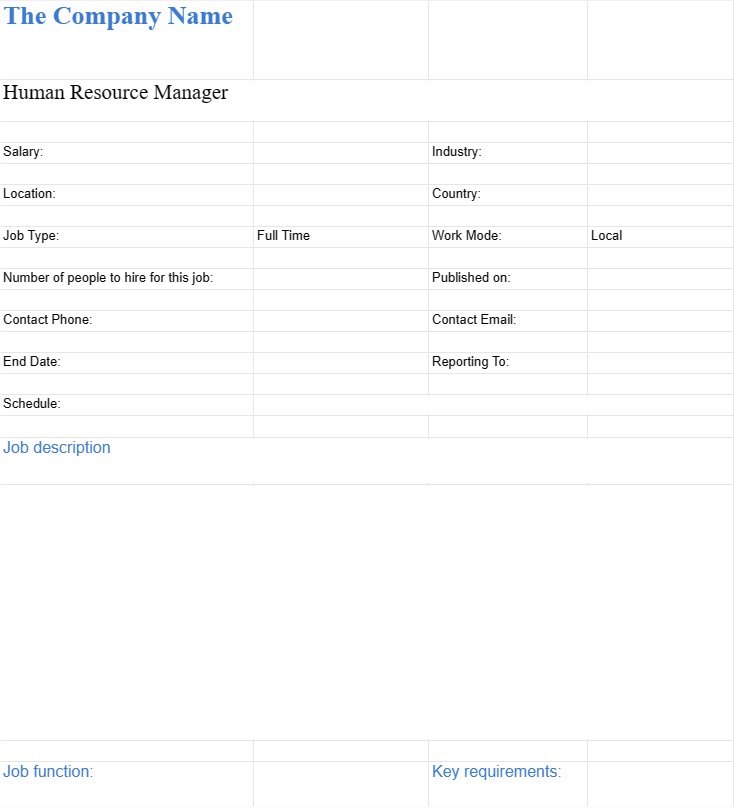
A Job Information Document (JID) template for recruitment is a structured format used by organizations during the hiring process to compile comprehensive information about a specific job role. It serves as a detailed reference document that includes all relevant details about the position, making it easier for recruiters, hiring managers, and candidates to understand the role's responsibilities, requirements, and expectations.
Here are the key components and purposes of a Job Information Document (JID) template for recruitment:
- Job Title: Clearly state the job title to accurately identify the position. Ensure that the title aligns with the organization's job structure and hierarchy.
- Department/Division: Specify the department or division to which the position belongs. This helps candidates and internal stakeholders understand the role's place within the organizational structure.
- Reporting Structure: Indicate the position's place in the organizational hierarchy, including the direct supervisor, any subordinates (if applicable), and peer roles.
- Job Summary/Objective: Provide a concise yet comprehensive overview of the role's purpose, objectives, and primary responsibilities. This section should serve as a quick reference for candidates and recruiters.
- Key Responsibilities and Duties: List the main duties and responsibilities associated with the role in detail. Use bullet points or numbered lists to present this information clearly. Be specific and include any tasks that are unique to the position.
- Qualifications and Requirements:
- Education: Specify the required educational qualifications, such as degrees, certifications, or licenses.
- Experience: Detail the minimum years of relevant work experience expected from candidates.
- Skills: Outline the essential skills, technical proficiencies, and competencies necessary for success in the role.
- Preferred Qualifications: Mention any additional qualifications or skills that would be advantageous for the role.
- Key Performance Indicators (KPIs): If applicable, describe the performance metrics, targets, or objectives that the employee in this role will be responsible for achieving. This helps candidates understand how their success will be measured.
- Work Environment: Provide information about the work environment, including factors like office location, travel requirements, and any special conditions (e.g., exposure to hazardous materials).
- Salary and Benefits: Include details about compensation, such as salary range, bonuses, benefits (e.g., health insurance, retirement plans), and any other perks or allowances. Note that some organizations may prefer to keep salary information confidential until later in the recruitment process.
- Application Instructions: Clearly outline how candidates should apply for the position. Include details such as the application deadline, contact information for submitting applications, and any specific documents or information required (e.g., resume, cover letter, portfolio).
- Equal Opportunity Statement: Include an equal opportunity statement to emphasize the organization's commitment to diversity and non-discrimination in the hiring process.
- Company Overview: Provide a brief overview of the organization, its mission, values, and culture. This helps candidates align their aspirations with the company's ethos.
- Date of Posting: Indicate the date when the JID was created or last updated. This helps candidates understand the timeline of the recruitment process.
- Approval and Review: Specify the names or positions of individuals responsible for approving and reviewing the JID. This ensures accountability in maintaining accurate job information.
- Customization: JID templates can be customized to match the specific needs of each job role and organization. Sections can be added or modified as necessary.
By using a Job Information Document (JID) template for recruitment, organizations can ensure that all stakeholders have access to consistent and comprehensive information about job roles. This transparency promotes efficient recruitment processes and helps candidates make informed decisions about their applications.
Einfache Vorschau und Download der Tabellenvorlage
Sehen Sie sich die Vollversion einer Tabellenkalkulationsvorlage ohne Einschränkungen an, um zu sehen, ob sie Ihnen gefällt. Anschließend können Sie die Excel-Vorlage herunterladen, sie auf Ihrem Gerät speichern und kostenlos verwenden.
Greifen Sie von überall auf die Tabellenvorlage zu
Dies funktioniert auf allen gängigen Betriebssystemen wie Windows, MacOS, Linux, iOS. Sie können die Tabellenvorlagen ansehen und ohne zusätzliche Programme herunterladen.
So verwenden Sie eine Vorlage
Finden Sie heraus, wie Sie die Tabellenvorlage in der Vorschau anzeigen, herunterladen und dann verwenden können, indem Sie die Schritte befolgen, die äußerst einfach zu befolgen sind
Weitere ähnliche Vorlagen
Sehen Sie sich weitere Tabellenvorlagen an, die zur gleichen Kategorie gehören wie die ausgewählte.













