
Eisenhower Box
Kategorie : Planer
This is spreadsheet template simulate a famous scientific model which you can use for your project or personal purpose.
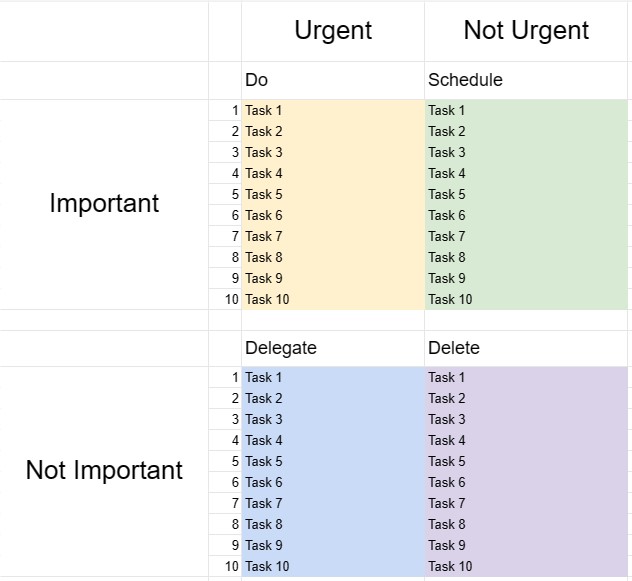
The Eisenhower Box, also known as the Eisenhower Matrix or Urgent-Important Matrix, is a decision-making and time management tool inspired by a quote attributed to President Dwight D. Eisenhower: What is important is seldom urgent, and what is urgent is seldom important. This template is designed to help individuals prioritize tasks and make decisions about how to allocate their time and resources effectively.
Key Components of an Eisenhower Box Template:
- Four Quadrants: The template is divided into four quadrants, each representing a different category of tasks based on their urgency and importance.
- Quadrant I - Urgent and Important: Tasks in this quadrant are both urgent and important. They require immediate attention and should be tackled as a top priority.
- Quadrant II - Not Urgent but Important: Tasks in this quadrant are important but not urgent. They represent proactive and long-term activities that contribute to personal and professional growth and success. Planning and scheduling these tasks is key.
- Quadrant III - Urgent but Not Important: Tasks in this quadrant are urgent but not particularly important. They may include interruptions, distractions, or tasks that can be delegated or minimized to free up time for more important matters.
- Quadrant IV - Not Urgent and Not Important: Tasks in this quadrant are neither urgent nor important. They are often time-wasting activities and should be minimized or eliminated.
- Task List: Users list their tasks in the appropriate quadrant based on their assessment of each task's urgency and importance.
- Action Plan: For tasks in Quadrants I and II, users can create action plans, set deadlines, and specify the steps required to complete them.
- Review and Update: Regularly reviewing and updating the Eisenhower Box helps individuals stay focused on what truly matters and adapt their priorities as needed.
Benefits of Using an Eisenhower Box Template:
- Priority Setting: Provides a structured framework for prioritizing tasks and making decisions about where to allocate time and effort.
- Time Management: Helps users focus on tasks that contribute to long-term goals and reduce time spent on unimportant or reactive activities.
- Productivity: Increases productivity by emphasizing important tasks and reducing time wasted on less important ones.
- Stress Reduction: Allows users to address urgent matters promptly while also allocating time to important but non-urgent tasks, reducing stress and the feeling of constantly reacting to crises.
- Goal Achievement: Supports progress toward long-term goals and personal development by emphasizing important tasks.
- Efficiency: Helps individuals work smarter by identifying tasks that can be delegated, eliminated, or minimized.
- Time Awareness: Promotes awareness of how time is spent and encourages more intentional use of time.
In conclusion, an Eisenhower Box Template is a valuable tool for individuals seeking to manage their time effectively, prioritize tasks, and make informed decisions about where to invest their efforts. By categorizing tasks based on their urgency and importance, users can increase productivity, reduce stress, and work toward achieving their goals more efficiently.
Einfache Vorschau und Download der Tabellenvorlage
Sehen Sie sich die Vollversion einer Tabellenkalkulationsvorlage ohne Einschränkungen an, um zu sehen, ob sie Ihnen gefällt. Anschließend können Sie die Excel-Vorlage herunterladen, sie auf Ihrem Gerät speichern und kostenlos verwenden.
Greifen Sie von überall auf die Tabellenvorlage zu
Dies funktioniert auf allen gängigen Betriebssystemen wie Windows, MacOS, Linux, iOS. Sie können die Tabellenvorlagen ansehen und ohne zusätzliche Programme herunterladen.
So verwenden Sie eine Vorlage
Finden Sie heraus, wie Sie die Tabellenvorlage in der Vorschau anzeigen, herunterladen und dann verwenden können, indem Sie die Schritte befolgen, die äußerst einfach zu befolgen sind
Weitere ähnliche Vorlagen
Sehen Sie sich weitere Tabellenvorlagen an, die zur gleichen Kategorie gehören wie die ausgewählte.













