Bills to pay
Kategorie : Rechnungen
Better organize and manage to pay all of the bill by using this, possibly save you more money than you think.
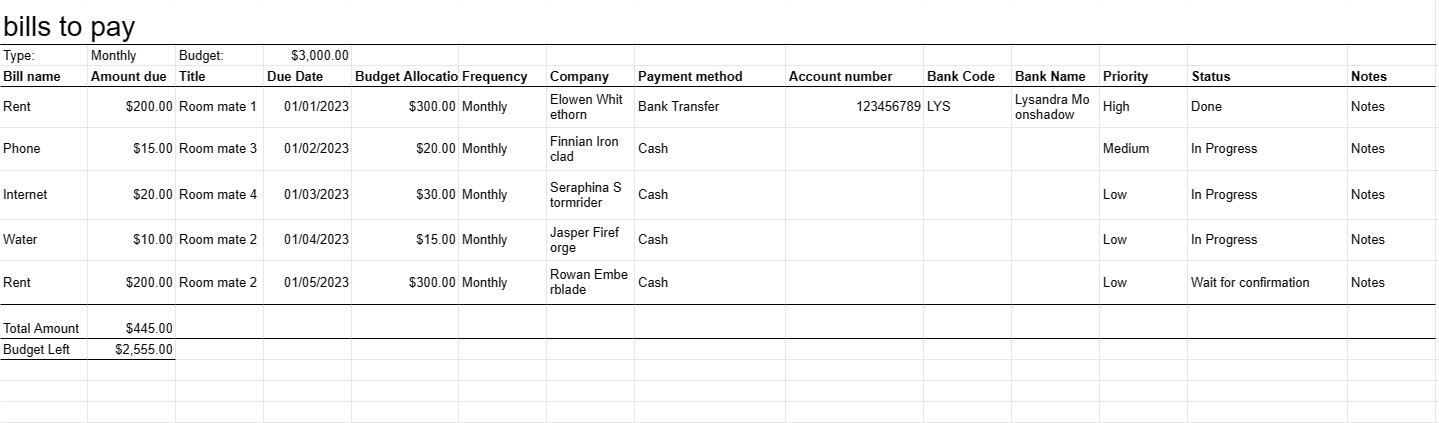
A Bills to Pay Template is a financial planning tool that helps individuals and businesses keep track of their upcoming expenses, bills, and financial obligations. This template allows users to list and manage various bills and payments, ensuring that they are paid on time and that budgeting remains on track.
Key Components of a Bills to Pay Template:
- Bill Details: For each bill or financial obligation, the template includes fields to record the following information:
- Bill name or description (e.g., rent, utilities, mortgage, credit card)
- Bill due date
- Billing company or entity
- Account number or reference
- Amount due
- Payment method (e.g., online, check, automatic withdrawal)
- Frequency (e.g., monthly, quarterly, annually)
- Total Amount Due: Provides a running total of all upcoming bills to give users an overview of their total financial commitments.
- Payment Status: Users can mark bills as paid or unpaid, providing a visual indication of which bills have been settled and which are still pending.
- Notes or Comments: Allows users to add notes or comments related to specific bills, such as reminders or payment confirmation numbers.
- Budget Allocation: Some templates include a section for users to allocate budgeted amounts for each bill category, helping them plan and prioritize their expenses.
- Priority or Importance: Users may assign a priority level (e.g., high, medium, low) to each bill to help determine which bills should be paid first if necessary.
- Payment Method Tracking: Records the chosen method of payment (e.g., bank transfer, credit card) for each bill.
Benefits of Using a Bills to Pay Template:
- Organization: Ensures that upcoming bills and financial obligations are organized and easy to access.
- imely Payments: Helps users avoid late fees and penalties by reminding them of upcoming due dates.
- Budgeting: Facilitates budget planning by providing a clear overview of expected expenses.
- Financial Planning: Supports financial planning and decision-making by allowing users to see their financial obligations in advance.
- Record Keeping: Maintains a record of past and future bill payments for financial tracking and reference.
- Financial Control: Encourages better financial control by keeping users aware of their financial commitments.
- Reduced Stress: Alleviates the stress associated with managing multiple bills by providing a structured approach.
- Efficiency: Streamlines the bill payment process by centralizing bill information and payment details.
In conclusion, a Bills to Pay Template is a valuable tool for individuals and businesses to manage their financial obligations efficiently. It helps users stay organized, avoid late payments, and maintain control over their finances by providing a clear and structured overview of upcoming bills and expenses.
Einfache Vorschau und Download der Tabellenvorlage
Sehen Sie sich die Vollversion einer Tabellenkalkulationsvorlage ohne Einschränkungen an, um zu sehen, ob sie Ihnen gefällt. Anschließend können Sie die Excel-Vorlage herunterladen, sie auf Ihrem Gerät speichern und kostenlos verwenden.
Greifen Sie von überall auf die Tabellenvorlage zu
Dies funktioniert auf allen gängigen Betriebssystemen wie Windows, MacOS, Linux, iOS. Sie können die Tabellenvorlagen ansehen und ohne zusätzliche Programme herunterladen.
So verwenden Sie eine Vorlage
Finden Sie heraus, wie Sie die Tabellenvorlage in der Vorschau anzeigen, herunterladen und dann verwenden können, indem Sie die Schritte befolgen, die äußerst einfach zu befolgen sind
Weitere ähnliche Vorlagen
Sehen Sie sich weitere Tabellenvorlagen an, die zur gleichen Kategorie gehören wie die ausgewählte.