
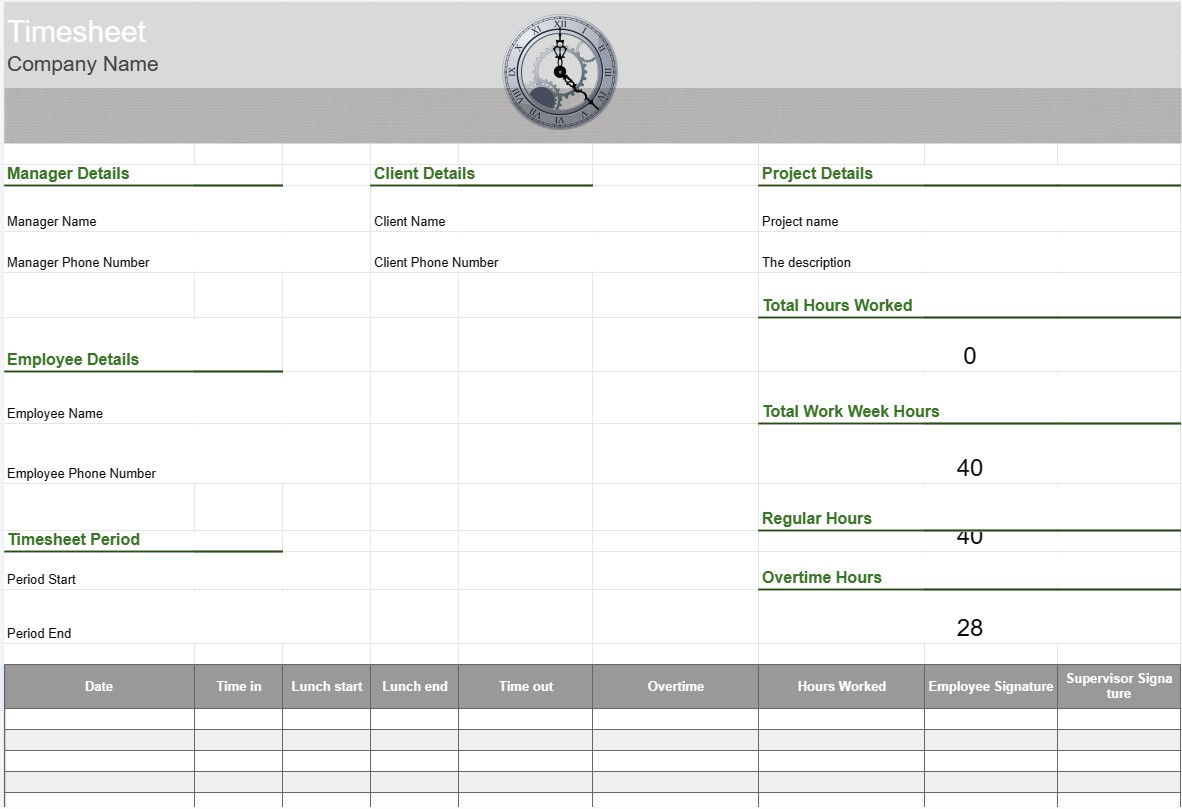
Timeseddel
Kategori : Sporer
Arbejdstidsseddel til at spore medarbejderne for at opnå overblik i forhold til, hvad afdelingen laver i arbejdstiden.
En timeseddelskabelon er et værktøj, der bruges af medarbejdere og organisationer til at spore og registrere den tid, der bruges på forskellige opgaver, projekter eller opgaver. Timesedler bruges almindeligvis til at spore arbejdstimer, uanset om det er til lønformål, projektstyring eller overvågning af fakturerbare timer for kunder. Timeseddelskabeloner hjælper med at sikre nøjagtig tidsregistrering og -rapportering.
Nøglekomponenter i en timeseddelskabelon:
- Medarbejderoplysninger: Skabelonen indeholder detaljer om medarbejder, såsom deres navn, medarbejder-id, afdeling og kontaktoplysninger.
- Dato og tid: Et kalender- eller tabelformat viser datoer og tidspunkter, hvor medarbejderne registrerer deres arbejdstimer . Dette kan organiseres efter dage, uger eller måneder.
- Opgave/projektdetaljer: Medarbejdere indtaster detaljer om de opgaver eller projekter, de arbejder på. Dette kan omfatte projektnavne, opgavebeskrivelser eller projektkoder.
- Time In and Time Out: For hver dag registrerer medarbejderne det tidspunkt, hvor de startede og afsluttede arbejdet, samt eventuelle pauser i løbet af arbejdsdagen.
- Total timer: Skabelonen beregner det samlede antal arbejdstimer hver dag, uge eller måned baseret på tidsangivelserne.
- Overtidssporing: Hvis det er relevant, kan skabelonen indeholde sektioner til sporing af overarbejdstimer, herunder almindeligt overarbejde, dobbeltarbejde og eventuelle gældende takster.
- Kunde eller Kunde: Hvis arbejdet er relateret til kundeprojekter, kan skabelonen indeholde et felt til at angive kundens eller kundens navn.
- Godkendelse og signatur: Nogle timesedler inkludere pladser, hvor medarbejdere kan underskrive og tilsynsførende eller ledere til at godkende de registrerede timer.
- Noter eller kommentarer: Medarbejdere kan tilføje noter eller kommentarer relateret til specifikke opgaver eller tidsangivelser, som f.eks. forklaringer på overarbejde eller yderligere kontekst.
- Ugeafslutning: Timesedlen angiver typisk slutdatoen for arbejdsugen eller rapporteringsperioden.
Fordele. Brug af en timeseddelskabelon:
- Nøjagtig tidsregistrering: Sikrer, at medarbejdernes arbejdstimer registreres nøjagtigt, hvilket er afgørende for lønbehandling, projektfakturering og overholdelse af arbejdstid love.
- Projektledelse: Hjælper projektledere og teams med at spore den tid, der bruges på forskellige projektopgaver, hvilket giver mulighed for bedre projektplanlægning og ressourceallokering.
- Lønbehandling: Forenkler lønningsprocessen ved at give en detaljeret registrering af medarbejdernes arbejdstimer, inklusive overarbejde og fri.
- Kundefakturering: Letter faktureringsklienter for fakturerbare arbejdstimer, hvilket gør det nemmere at fakturere nøjagtigt.
- Overholdelse: Hjælper organisationer med at overholde arbejdslovgivningen og ansættelseslovgivningen vedrørende arbejdstid og overarbejde.
- Performanceanalyse: Giver data til at analysere medarbejdernes produktivitet og opgaveeffektivitet.
- Dokumentation: Fungerer som en registrering af arbejdstimer, hvilket kan være nyttigt til revisioner , tvister eller fremtidig reference.
- Gennemsigtighed: Fremmer gennemsigtighed i tidsregistrering og arbejdsrapportering, hjælper medarbejdere og arbejdsgivere med at bevare tilliden.
Afslutningsvis er en timeseddelskabelon et værdifuldt værktøj til nøjagtigt at spore og dokumentere medarbejdernes arbejdstimer og opgaver. Det er essentielt til forskellige formål, herunder lønbehandling, projektstyring, kundefakturering og overholdelse af arbejdslove og -regler.
Nem forhåndsvisning og download regnearkskabelon
Se den fulde version af en regnearksskabelon uden begrænsninger for at se, om du kan lide den, så kan du downloade excel-skabelonen for at gemme den på din enhed og bruge den gratis.
Få adgang til regnearksskabelon fra hvor som helst
Dette fungerer på alle populære operativsystemer såsom Windows, MacOS, Linux, iOS. Du kan se regnearksskabelonerne og downloade dem uden yderligere programmer.
Sådan bruger du en skabelon
Find ud af, hvordan du kan forhåndsvise, downloade og derefter bruge regnearksskabelonen ved at følge trinene, som er ekstremt nemme at følge
Flere lignende skabeloner
Se flere af regnearksskabelonerne, som er under samme kategori med den valgte.













