
Password Tracker
Kategori : Sporer
Extremely useful for the people whom are usually forgetting the secret codes, because of they can use this to store access keys including websites addresses, apps names and the secrets.
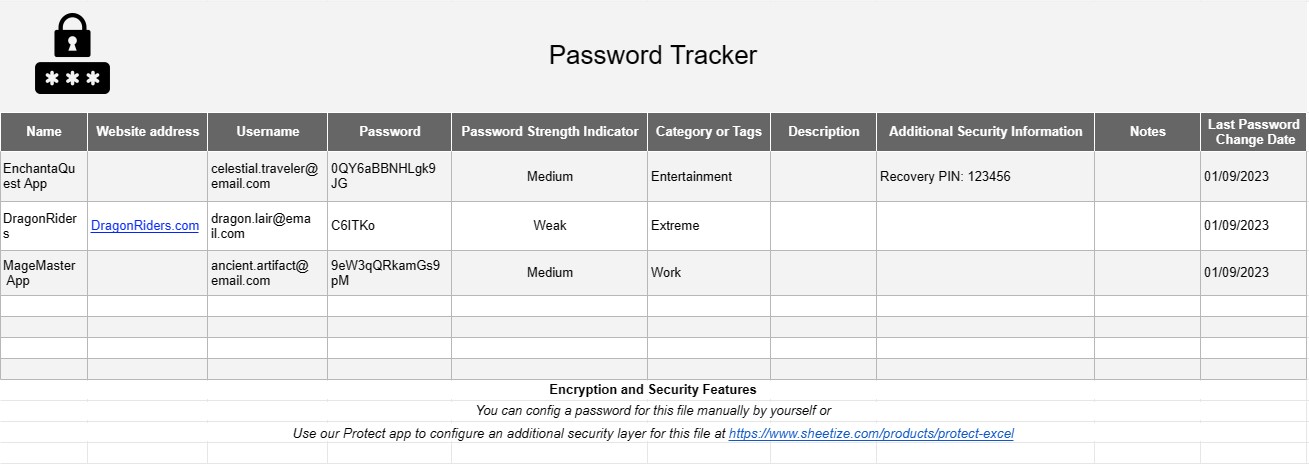
The Password Tracker template is a practical and security-focused tool designed to help individuals and organizations securely manage and organize their passwords and login credentials. In today's digital age, where multiple online accounts and services are part of daily life, the Password Tracker template serves as a secure repository for storing and retrieving sensitive login information.
Here are the key components and features typically included in a Password Tracker template:
- Website or Service: The template allows users to list the names or URLs of the websites or online services for which they have accounts.
- Username/Email: For each website or service, users provide their associated usernames or email addresses.
- Password: This section is for recording the corresponding passwords. For security reasons, passwords are often encrypted or stored in a secure manner to protect against unauthorized access.
- Additional Security Information: Some templates include fields for additional security information, such as security questions and answers, two-factor authentication methods, or PINs.
- Notes: A section for adding notes or reminders related to specific accounts or passwords, such as account creation dates, special instructions, or reasons for using certain passwords.
- Last Password Change Date: Users can track the date when they last changed their passwords, which is important for security best practices.
- Password Strength Indicator: Some templates may include a feature to assess the strength of passwords and suggest improvements to enhance security.
- Category or Tags: The ability to categorize or tag entries helps users organize their passwords and quickly locate specific accounts.
- Encryption and Security Features: To ensure the security of stored passwords, many templates offer encryption or other security features. It is crucial to choose a secure method for storing passwords, such as using a reputable password manager tool.
The Password Tracker template addresses several key needs:
- Password Organization: It provides a structured and organized way to store login credentials for multiple websites and services, making it easier to keep track of them.
- Security: By securely storing passwords, the template helps protect against unauthorized access and potential data breaches.
- Password Rotation: Users can track when passwords were last changed, encouraging regular password updates for improved security.
- Accessibility: Having a centralized location for password information ensures that users can quickly access the information they need when logging in to various accounts.
- Password Recovery: In cases where users forget passwords, having a record of security questions and answers can facilitate account recovery.
It's important to note that while a Password Tracker template can be a useful tool, security is paramount. Storing passwords should be done securely, and using a reputable password manager application is often recommended. These applications provide advanced encryption and security features to protect sensitive login information.
In summary, the Password Tracker template is a valuable aid in managing and securing login credentials for the multitude of online accounts and services used in today's digital world. It promotes better password management practices, enhances security, and simplifies the process of accessing and managing online accounts.
Nem forhåndsvisning og download regnearkskabelon
Se den fulde version af en regnearksskabelon uden begrænsninger for at se, om du kan lide den, så kan du downloade excel-skabelonen for at gemme den på din enhed og bruge den gratis.
Få adgang til regnearksskabelon fra hvor som helst
Dette fungerer på alle populære operativsystemer såsom Windows, MacOS, Linux, iOS. Du kan se regnearksskabelonerne og downloade dem uden yderligere programmer.
Sådan bruger du en skabelon
Find ud af, hvordan du kan forhåndsvise, downloade og derefter bruge regnearksskabelonen ved at følge trinene, som er ekstremt nemme at følge
Flere lignende skabeloner
Se flere af regnearksskabelonerne, som er under samme kategori med den valgte.