
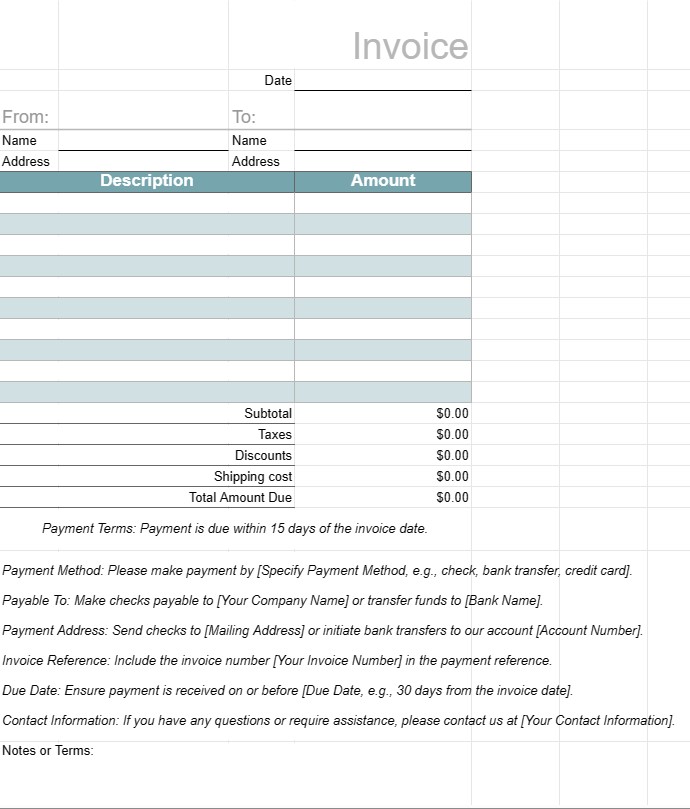
Faktura 1
Kategori : Planlæggere
En fakturaskabelon til at sende til kunderne efter et job er udført
En fakturaskabelon er et standardiseret dokument, der bruges af virksomheder til at fakturere deres kunder eller kunder for leverede varer eller tjenester. Den fungerer som en formel anmodning om betaling og inkluderer detaljer om produkterne eller tjenesterne, deres omkostninger, betalingsbetingelser og kontaktoplysninger for både virksomheden og kunden. Fakturaer er afgørende for sporing af transaktioner, styring af pengestrømme og vedligeholdelse af finansielle poster.
Nøglekomponenter i en fakturaskabelon:
- Overskrift: øverste sektion af fakturaen indeholder typisk virksomhedens navn, logo og kontaktoplysninger samt fakturanummer og udstedelsesdato.
- Kundeoplysninger: Dette afsnit omfatter kundens navn, virksomhed (hvis relevant), faktureringsadresse og kontaktoplysninger.
- Fakturaoplysninger: En oversigt over de leverede produkter eller tjenester er inkluderet i dette afsnit. Hver linjepost inkluderer en beskrivelse, mængde, enhedspris og samlet beløb.
- Subtotal: Subtotalen er summen af alle linjeposter før afgifter eller ekstra gebyrer.
- Skatter: Hvis det er relevant, er eventuel moms, moms eller andre afgifter specificeret separat.
- Rabatter: Eventuelle gældende rabatter, kuponer , eller kampagnetilbud er angivet i dette afsnit.
- Forsendelse og håndtering: Hvis fakturaen inkluderer gebyrer for forsendelse eller håndtering, angives de separat.
- Samlet skyldigt beløb: Dette er det samlede beløb for fakturaen, inklusive alle gebyrer, skatter, rabatter og gebyrer.
- Betalingsbetingelser: Betalingen vilkår angiver forfaldsdatoen, accepterede betalingsmetoder (f.eks. bankoverførsel, check, kreditkort) og eventuelle bøder for forsinket betaling.
- Betalingsinstruktioner: Bankkontooplysninger eller betalingsinstruktioner. leveres for at lette betalingsprocessen.
- Bemærkninger eller vilkår: Eventuelle yderligere vilkår, instruktioner eller særlige bemærkninger, der er relevante for fakturaen eller transaktionen, kan være inkluderet.
- Fakturasidefod: Nogle fakturaer indeholder en sidefod med yderligere kontaktoplysninger eller en takbesked.
Fordele ved at bruge en fakturaskabelon:
- Professionalisme: Præsenterer et professionelt image for kunderne og viser, at virksomheden fungerer effektivt og systematisk.
- Tydelighed: Skitserer klart de leverede produkter eller tjenester , deres omkostninger og betalingsoplysninger, hvilket reducerer risikoen for uenigheder eller misforståelser.
- Registrering: Hjælper virksomheder med at opretholde nøjagtige registreringer af finansielle transaktioner til regnskabs-, skatte- og revisionsformål.
- Effektivitet: Sparer tid ved at levere et standardiseret format, der kan tilpasses til hver klient eller transaktion.
- Juridisk beskyttelse: Giver en formel fortegnelse over aftalen mellem virksomheden og kunden, hvilket kan være nyttigt i tilfælde af tvister.
- Prompt betaling: Opfordrer kunder til at betale hurtigt ved at angive forfaldsdatoer og betalingsinstruktioner.
- Konsistens: Sikrer, at fakturaer er konsistente i format og indhold, hvilket er vigtigt for virksomheder, der har at gøre med flere kunder.
Afslutningsvis er en fakturaskabelon et vigtigt værktøj for virksomheder til at fakturere kunder og kunder på en struktureret og professionel måde. Det hjælper med at strømline betalingsprocessen, vedligeholde økonomiske optegnelser og etablere klare forventninger til betalinger og vilkår.
Nem forhåndsvisning og download regnearkskabelon
Se den fulde version af en regnearksskabelon uden begrænsninger for at se, om du kan lide den, så kan du downloade excel-skabelonen for at gemme den på din enhed og bruge den gratis.
Få adgang til regnearksskabelon fra hvor som helst
Dette fungerer på alle populære operativsystemer såsom Windows, MacOS, Linux, iOS. Du kan se regnearksskabelonerne og downloade dem uden yderligere programmer.
Sådan bruger du en skabelon
Find ud af, hvordan du kan forhåndsvise, downloade og derefter bruge regnearksskabelonen ved at følge trinene, som er ekstremt nemme at følge
Flere lignende skabeloner
Se flere af regnearksskabelonerne, som er under samme kategori med den valgte.













