
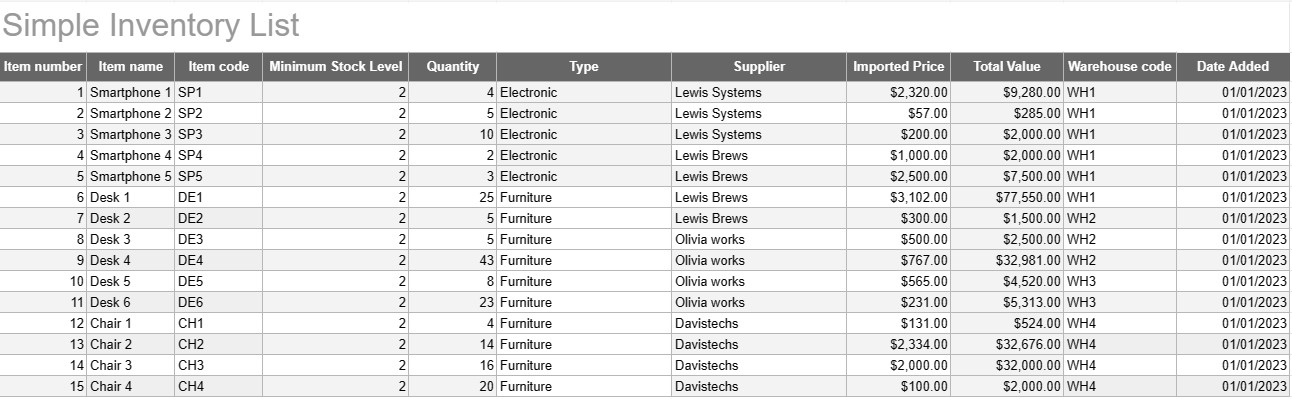
Llista d'inventari simple
Categoria : Seguidors
Anoteu tots els noms i descripcions de l'inventari perquè pugueu veure'ls tots en un sol lloc.
Una plantilla de llista d'inventari simple és una eina bàsica però eficaç que fan servir les persones i les empreses per fer un seguiment i gestionar el seu inventari de béns, productes o actius. Aquesta plantilla proporciona un format estructurat per registrar els detalls dels articles, les quantitats, les ubicacions i altra informació rellevant, facilitant el seguiment dels nivells d'inventari i una gestió eficient.
Components clau d'una plantilla de llista d'inventari simple:
- Detalls de l'element: la plantilla inclou columnes o seccions per a informació específica de l'article, com ara el nom de l'element, la descripció, l'identificador únic (per exemple, el SKU o el número de sèrie) i qualsevol nota addicional.
- Quantitat: els usuaris poden registrar la quantitat o unitats de cada article en estoc. Aquesta columna és essencial per fer un seguiment dels nivells d'inventari amb precisió.
- Ubicació: per a empreses amb diverses ubicacions d'emmagatzematge o magatzems, la plantilla pot incloure una columna per especificar la ubicació física de cada article. Això ajuda a racionalitzar la recuperació i la reposició.
- Preu unitari: els usuaris poden introduir el preu unitari o el cost de cada article. Aquesta informació és valuosa per calcular el valor total de l'inventari.
- Valor total: algunes plantilles calculen automàticament el valor total de cada article en funció de la quantitat i el preu unitari. Això proporciona una visió general ràpida del valor total de l'inventari.
- Data afegida/actualitzada: per fer un seguiment dels canvis i actualitzacions de l'inventari, els usuaris poden registrar la data en què s'ha afegit o modificat cada element.
- Categoria/Tipus: els articles es poden classificar en diferents grups o tipus (p. ex., electrònica, material d'oficina, roba) per a una millor organització i informes.
- Nivell d'estoc mínim: els usuaris poden establir un nivell d'estoc mínim per a cada article. Quan la quantitat cau per sota d'aquest nivell, serveix com a activador per reordenar o reposar l'article.
- Informació del proveïdor: en un entorn empresarial, els usuaris poden incloure detalls del proveïdor, com ara el nom del proveïdor, la informació de contacte i la informació de reordenació.
Avantatges d'utilitzar una plantilla de llista d'inventari simple:
- Seguiment d'inventari: ofereix una instantània clara i actualitzada dels nivells d'inventari, ajudant a prevenir les existències i l'excés d'existències.
- Control de costos: permet a les empreses controlar el valor del seu inventari i prendre decisions informades sobre la reposició i la compra.
- Eficiència: racionalitza la gestió de l'inventari centralitzant la informació i fent-la fàcilment accessible.
- Precisió de les dades: redueix el risc d'errors en el seguiment de l'inventari, ja que tota la informació es registra sistemàticament.
- Gestió de comandes: Ajuda a identificar quan reordenar articles i de quins proveïdors, millorant la gestió de la cadena de subministrament.
- Compliment: en algunes indústries, el manteniment de registres d'inventari precisos és essencial per al compliment de la normativa i els informes financers.
- Optimització de recursos: permet a les empreses assignar els recursos de manera més eficaç i reduir els costos de transport.
En conclusió, una plantilla de llista d'inventari simple és una eina pràctica per a persones i empreses que busquen mantenir registres organitzats i precisos del seu inventari. Tant si s'utilitza per a un petit inventari d'habitatges com com a part d'una operació empresarial més gran, aquesta plantilla simplifica la gestió de l'inventari, redueix el risc d'escassetat o excés d'existències i contribueix a un millor control financer i a la presa de decisions.
Fàcil visualització prèvia i descàrrega de la plantilla de full de càlcul
Vegeu la versió completa d'una plantilla de full de càlcul sense limitacions per veure si us agrada, podeu descarregar la plantilla d'Excel per emmagatzemar-la al vostre dispositiu i utilitzar-la gratuïtament.
Accediu a la plantilla de full de càlcul des de qualsevol lloc
Això funciona en tots els sistemes operatius populars com Windows, MacOS, Linux, iOS. Podeu veure les plantilles de full de càlcul i descarregar-les sense programes addicionals.
Com utilitzar una plantilla
Descobriu com previsualitzar, baixar i utilitzar la plantilla del full de càlcul seguint els passos que són molt fàcils de seguir
Plantilles més semblants
Vegeu més de les plantilles de full de càlcul que es troben a la mateixa categoria que l'escollida.













