
Cronologia del projecte
Categoria : Seguidors
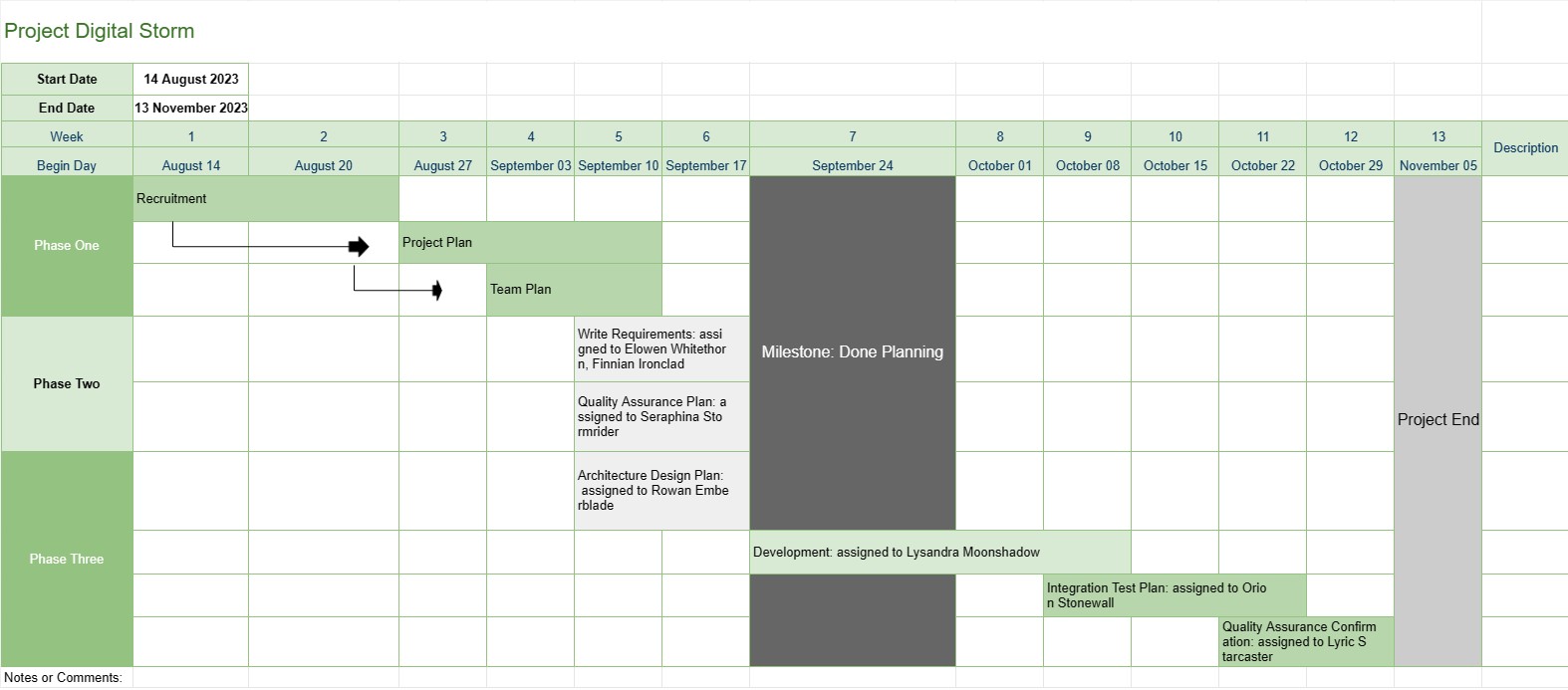
Això proporciona una millor visió general d'un projecte al director del projecte, inclou les fases, les tasques i la data de venciment de tota la progressió del desenvolupament, a més de que totes les dades s'han visualitzat de manera atractiva.
La plantilla de cronologia del projecte és una eina fonamental de gestió de projectes que ofereix una representació visual de les fites, tasques i terminis clau del projecte durant un període determinat. Serveix com a full de ruta per als equips del projecte i les parts interessades, oferint una visió general clara i concisa del progrés i la programació del projecte.
A continuació es mostren els components i les funcions clau que s'inclouen normalment en una plantilla de cronologia del projecte:
- Nom del projecte: la plantilla comença amb el nom o el títol del projecte per facilitar la identificació.
- Durada del projecte: especifica l'inici. data i data de finalització del projecte, definint el període de temps en què s'acabarà el projecte.
- Fites: Les fites són esdeveniments o assoliments significatius dins del projecte que marquen punts de progrés importants. Normalment es representen com a dates específiques a la línia de temps i serveixen com a punts de referència per fer un seguiment del progrés del projecte.
- Tasques o activitats: la plantilla descriu les diferents tasques, activitats o fases implicades. en el projecte. Cada tasca s'associa amb una data d'inici i una durada estimada.
- Dependències: Algunes plantilles de cronologia del projecte inclouen fletxes o línies que connecten les tasques per il·lustrar les dependències de les tasques. Això ajuda els equips de projecte a entendre l'ordre en què s'han de completar les tasques.
- Recursos assignats: els directors de projecte poden indicar quins membres o recursos de l'equip són responsables de cada tasca. Això facilita l'assignació de recursos i l'assignació de tasques.
- Durada de les tasques: sovint es mostra la durada estimada de cada tasca, cosa que permet als equips avaluar quant de temps trigarà cada activitat.
- Seguiment del progrés: la plantilla pot incloure indicadors visuals per fer un seguiment de la finalització de les tasques i del progrés general del projecte.
- Camí crític: a la cronologia del projecte més avançada. plantilles, es pot identificar el camí crític, que representa la seqüència de tasques que determinen la durada mínima del projecte.
- Notes o comentaris: els usuaris poden afegir notes, comentaris o descripcions. per proporcionar context o detalls addicionals per a tasques o fites específiques.
La plantilla de cronologia del projecte té un paper fonamental en la gestió de projectes, ja que ofereix diversos avantatges clau:
- Visualització: ofereix una representació visual del projecte, cosa que facilita que els equips del projecte i les parts interessades entenguin l'abast, el calendari i els resultats clau del projecte.
- Comunicació: La línia de temps serveix com a eina de comunicació, que permet als gestors de projectes transmetre el progrés i l'estat del projecte als membres de l'equip, clients i executius.
- Planificació i coordinació: equips de projecte. pot utilitzar la cronologia per planificar tasques, assignar recursos i coordinar activitats per garantir que el projecte es mantingui en bon camí.
- Gestió de riscos: En identificar les dependències de les tasques i els camins crítics, els directors de projecte poden gestionar de manera proactiva els riscos potencials i els colls d'ampolla.
- Documentació: la cronologia proporciona un registre històric de la progressió del projecte, ajudant amb l'anàlisi i la documentació posterior al projecte.
En resum, la plantilla Project Timeline és una eina de gestió de projectes indispensable que millora la planificació, l'execució i el seguiment del projecte. Assegura que els equips del projecte tinguin una comprensió clara dels objectius, els terminis i les dependències del projecte, contribuint finalment a la finalització del projecte amb èxit.
Fàcil visualització prèvia i descàrrega de la plantilla de full de càlcul
Vegeu la versió completa d'una plantilla de full de càlcul sense limitacions per veure si us agrada, podeu descarregar la plantilla d'Excel per emmagatzemar-la al vostre dispositiu i utilitzar-la gratuïtament.
Accediu a la plantilla de full de càlcul des de qualsevol lloc
Això funciona en tots els sistemes operatius populars com Windows, MacOS, Linux, iOS. Podeu veure les plantilles de full de càlcul i descarregar-les sense programes addicionals.
Com utilitzar una plantilla
Descobriu com previsualitzar, baixar i utilitzar la plantilla del full de càlcul seguint els passos que són molt fàcils de seguir
Plantilles més semblants
Vegeu més de les plantilles de full de càlcul que es troben a la mateixa categoria que l'escollida.














