
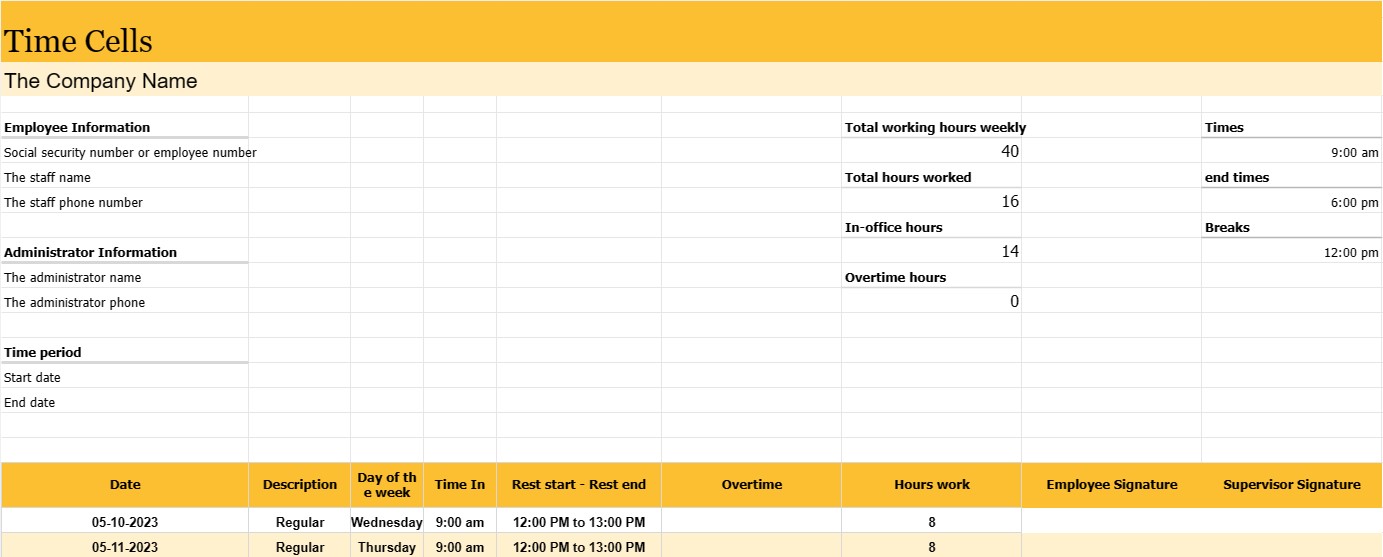
Времеви клетки
Категория : Тракери
Мениджърът трябва да използва това, за да управлява служителите, което им позволява да проследяват по-внимателно персонала си.
Отчетът за времето е запис или документ, използван за проследяване на времето на служител за определен период от време, обикновено работна седмица или период на заплащане. Това е основен инструмент за проследяване и управление на присъствието на служителите, изчисляване на заплатите и гарантиране на спазването на трудовото законодателство и политиките на компанията.
Докладите за служителите обикновено се използват в различни индустрии и работни места, включително фирми, държавни агенции, организации с нестопанска цел и много други.
Най-важните части и информация, които обикновено могат да бъдат намерени в трудовия дневник на служителя, са:
- Информация за служителя: Името на служителя и, в някои случаи, номер на социална осигуровка или номер на служител.
- Период от време: Конкретен период от време, обхванат от листа с часове, като напр. седмица, двумесечен период на плащане или месец. Дата: Датата или датите на всеки работен ден в рамките на посочения период от време.
- Ден от седмицата: съответният ден от седмицата за всяка дата (напр. понеделник, вторник) .
- Часове и крайни часове: точните часове, когато служителят започва и завършва смяната за всеки работен ден. Тази информация обикновено се съхранява в часове и минути.
- Почивки: времето на почивките на служителя, ако е приложимо, включително началния и крайния час на почивките за хранене и почивка. Общо отработени часове: Общият брой отработени часове от служителя за всеки работен ден и кумулативната сума за целия период.
- Извънреден труд: Ако служител е работил извънреден труд (най-общо дефиниран като часове повече от нормалната работна седмица или работен ден), те се отчитат отделно.
- Подписи на служител и ръководител: Много таблици за работно време включват места за подпис на служителя и ръководителя и проверка на точността на записаните часове.
Бюлетините за служители служат на няколко важни цели:
- Заплата: Те са основата за изчисляване на заплатите на служителите, включително редовни заплати, извънреден труд и всякакви допълнителни придобивки.
- Спазване на трудовото законодателство: Графиците за работно време помагат на организациите да спазват трудовите закони и разпоредби, особено тези, свързани със заплащането на извънреден труд и максималните часове.
- Проследяване на присъствието: Те наблюдават присъствието и точността на служителите, което може да бъде полезно при оценката на представянето и управлението на присъствието.
- Проследяване на проекти и задачи: В някои случаи за разпределяне на часове се използват таблици с часове към конкретни проекти или задачи, което ги прави ценни за управление на проекти и фактуриране.
- Записване: Графиците за време създават исторически запис на работните часове на служител, което може да бъде важно за одити, правни изисквания и досиета на човешките ресурси.
- Планиране на ресурсите: Графиците за време помагат на компаниите да планират и разпределят ресурсите, като предоставят информация за наличността на служителите и работното натоварване.
Докато някои организации продължават да използват традиционните хартиени таблици за отчитане на работното време, много компании преминаха към електронни системи за отчитане на времето, които предлагат по-голяма точност, удобство и ефективност. Електронните системи могат автоматично да изчисляват работните часове, да обработват изчисления за извънреден труд и да генерират отчети, опростявайки ведомостта и намалявайки вероятността от грешки.
Лесен преглед и изтегляне на шаблон на електронна таблица
Вижте пълната версия на шаблон за електронна таблица без ограничения, за да видите дали ви харесва, след което можете да изтеглите шаблона на excel, за да го съхраните на вашето устройство и да го използвате безплатно.
Достъп до шаблона на електронна таблица отвсякъде
Това работи на всички популярни операционни системи като Windows, MacOS, Linux, iOS. Можете да видите шаблоните на електронни таблици и да ги изтеглите без допълнителни програми.
Как да използвате шаблон
Разберете как да визуализирате, изтеглите и след това да използвате шаблона за електронна таблица, като следвате стъпките, които са изключително лесни за следване
Още подобни шаблони
Вижте повече от шаблоните за електронни таблици, които са в същата категория с избрания.













