
Лесно проследяване на кръвната захар
Категория : Тракери
Интегрирайте това с вашето устройство или му дайте информация ръчно, това ще ви даде идея как да визуализирате здравните данни.


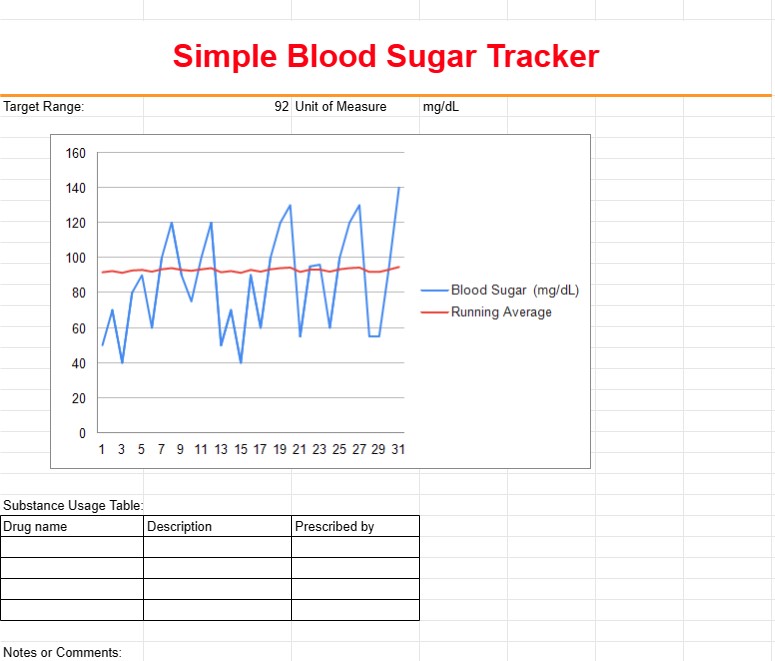
Прост шаблон за проследяване на кръвната захар е инструмент, използван от хора, особено тези с диабет или други здравословни проблеми, за наблюдение и записване на нивата на кръвната им захар във времето. Този шаблон помага на потребителите да проследяват колебанията в кръвната захар, да идентифицират модели и да споделят важна информация с доставчиците на здравни услуги, за да управляват ефективно здравето си.
Ключови компоненти на прост шаблон за проследяване на кръвната захар:
- Дата и час: Шаблонът включва колони за записване на датата и часа на всяко отчитане на кръвната захар. Потребителите могат да въвеждат множество показания през целия ден.
- Ниво на кръвна захар: Потребителите въвеждат нивата на кръвната си захар в съответните колони, обикновено измерени в милиграми на децилитър (mg/dL) или милимоли на литър (mmol/L).
- Преди/След хранене: Потребителите посочват дали всяко отчитане е направено преди или след хранене, което помага да се проследи как кръвната захар реагира на приема на храна.
- Бележки или коментари: Секция за потребителите да добавят бележки или коментари относно фактори, които може да са повлияли на нивата на кръвната захар, като упражнения, лекарства или заболяване.
- Целеви диапазон: В някои шаблони потребителите могат да задават и проследяват своя целеви диапазон на кръвната захар, за да видят дали техните показания са в рамките на желания диапазон.
- Лекарства: Ако е приложимо, потребителите могат да записват имената и дозите на всички лекарства или инсулин, които приемат.
Ползи от използването на Прост шаблон за проследяване на кръвната захар:
- Мониторинг: Предоставя изчерпателен преглед на нивата на кръвната захар във времето, което позволява на хората да наблюдават здравето си и да идентифицират тенденциите.
- Разпознаване на модели: Помага на потребителите да разпознават модели в колебанията на кръвната захар, като пикове или спадове, в отговор на различни фактори.
- Коригиране на лечението: Позволява на отделни лица и доставчици на здравни услуги да вземат информирани решения относно дозировките на лекарствата, диетични корекции или промени в начина на живот.
- Подобрена комуникация: Улеснява комуникацията между хората и доставчиците на здравни услуги, тъй като записаните данни могат да се споделят по време на медицински прегледи.
- Управление на лекарствата: Помага на хората да проследяват ефективността на лекарствата и дозите инсулин за поддържане на стабилни нива на кръвната захар.
- Самоуправление: Дава възможност на хората да поемат активна роля в управлението на здравето си и вземането на информирани решения относно грижите за диабета си.
- Ранно откриване : Позволява ранно откриване на потенциални проблеми или тенденции, които може да изискват медицинска помощ.
В обобщение, прост шаблон за проследяване на кръвната захар е ценен инструмент за лица, управляващи диабет или други здравословни състояния, които изискват проследяване на нивата на кръвната захар. Той подпомага проследяването, анализирането и управлението на данните за кръвната захар, като в крайна сметка допринася за по-добри здравни резултати и информирано вземане на решения относно лечението и избора на начин на живот.
Лесен преглед и изтегляне на шаблон на електронна таблица
Вижте пълната версия на шаблон за електронна таблица без ограничения, за да видите дали ви харесва, след което можете да изтеглите шаблона на excel, за да го съхраните на вашето устройство и да го използвате безплатно.
Достъп до шаблона на електронна таблица отвсякъде
Това работи на всички популярни операционни системи като Windows, MacOS, Linux, iOS. Можете да видите шаблоните на електронни таблици и да ги изтеглите без допълнителни програми.
Как да използвате шаблон
Разберете как да визуализирате, изтеглите и след това да използвате шаблона за електронна таблица, като следвате стъпките, които са изключително лесни за следване
Още подобни шаблони
Вижте повече от шаблоните за електронни таблици, които са в същата категория с избрания.













