Daily Appoinment Calendar
Категория : Календари
Your daily schedule will be more clearer if you use this to point out all of the appointments of the day.
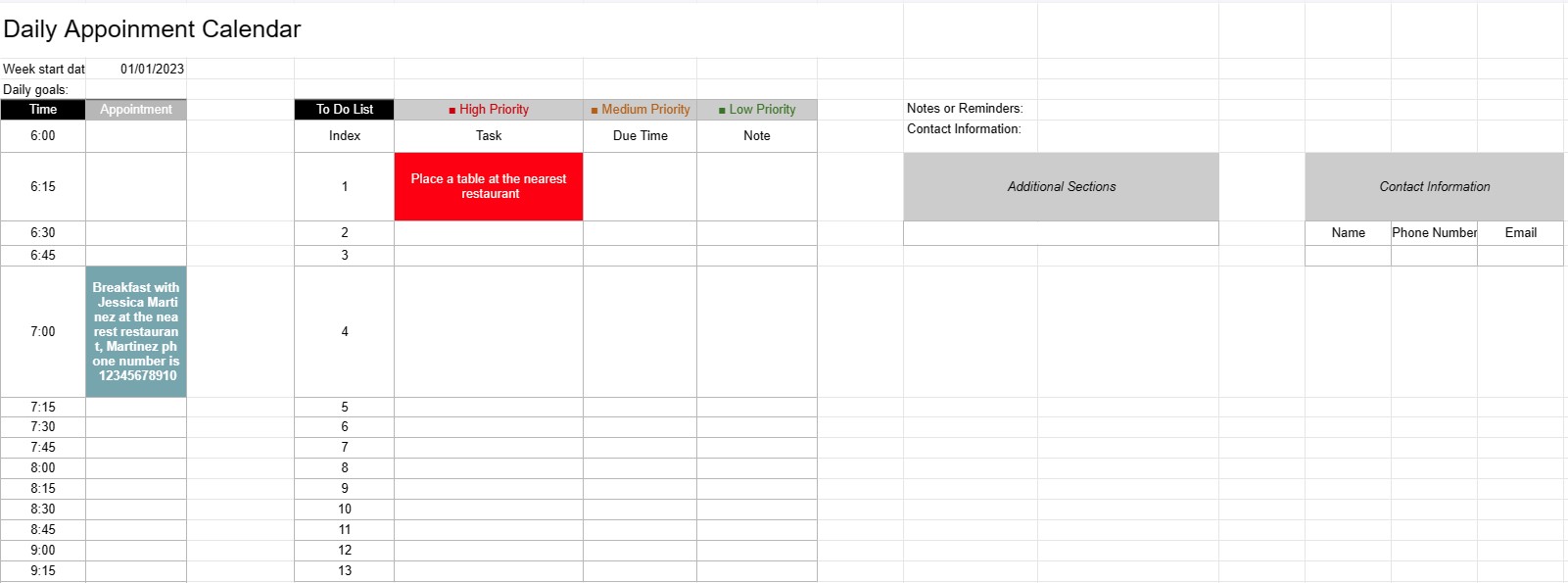
A Daily Appointment Calendar Template is a planning tool used by individuals, professionals, and businesses to schedule and manage their daily appointments, meetings, and tasks. It provides a structured layout for organizing daily activities, setting priorities, and ensuring that time is allocated efficiently.
Key Components of a Daily Appointment Calendar Template:
- Date: The template typically displays the date at the top of each daily page, allowing users to navigate through different days.
- Time Slots: The day is divided into time slots or hours, usually starting in the morning and ending in the evening. Each time slot represents a specific period during the day.
- Appointment Details: Users can enter appointment details within each time slot, including:
- Appointment time
- Title or description of the appointment
- Location or meeting room
- Contact information of individuals involved
- To-Do List: Some templates include a section for listing tasks or to-do items that need to be completed during the day. These can be categorized by priority or due time.
- Notes or Reminders: A space for general notes or reminders can be provided at the bottom of the page.
- Priorities or Goals: Some templates may include a section for setting daily priorities or goals, helping users stay focused on essential tasks.
- Contact Information: Contact details for important individuals or clients may be included for quick reference.
- Additional Sections: Depending on the template, additional sections for tracking expenses, mileage, or other specific information may be included.
Benefits of Using a Daily Appointment Calendar Template:
- Time Management: Helps users allocate their time effectively by scheduling appointments and tasks.
- Organization: Provides a structured way to keep track of daily commitments, reducing the risk of overbooking or missing appointments.
- Prioritization: Allows users to prioritize tasks and appointments, ensuring that the most important items are addressed first.
- Productivity: Facilitates better time management and increased productivity by providing a visual overview of the day's activities.
- Communication: Ensures that users are well-prepared for meetings and appointments by having all relevant information at their fingertips.
- Time Tracking: Can be used to track billable hours for professionals who charge by the hour.
- Reference: Serves as a reference point for reviewing past appointments and tasks.
- Efficiency: Enhances efficiency by reducing time wasted on disorganized scheduling and planning.
In conclusion, a Daily Appointment Calendar Template is a valuable tool for managing daily schedules, appointments, and tasks efficiently. It helps individuals and professionals stay organized, prioritize their activities, and make the most of their time.
Лесен преглед и изтегляне на шаблон на електронна таблица
Вижте пълната версия на шаблон за електронна таблица без ограничения, за да видите дали ви харесва, след което можете да изтеглите шаблона на excel, за да го съхраните на вашето устройство и да го използвате безплатно.
Достъп до шаблона на електронна таблица отвсякъде
Това работи на всички популярни операционни системи като Windows, MacOS, Linux, iOS. Можете да видите шаблоните на електронни таблици и да ги изтеглите без допълнителни програми.
Как да използвате шаблон
Разберете как да визуализирате, изтеглите и след това да използвате шаблона за електронна таблица, като следвате стъпките, които са изключително лесни за следване
Още подобни шаблони
Вижте повече от шаблоните за електронни таблици, които са в същата категория с избрания.