
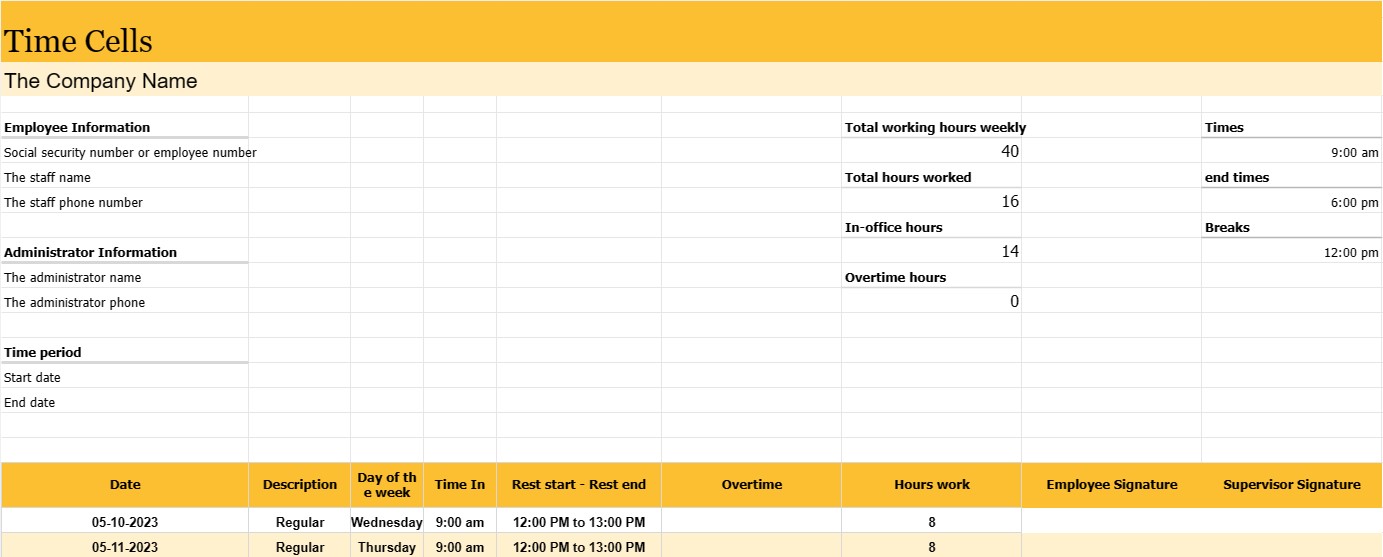
الخلايا الزمنية
فئة : أجهزة التتبع
يجب على المدير استخدام هذا لإدارة الموظفين ، مما يمكنهم من تتبع موظفيهم بعناية أكبر.
تقرير الوقت هو سجل أو مستند يستخدم لتتبع وقت الموظف خلال فترة زمنية محددة، عادةً ما تكون أسبوع عمل أو فترة دفع. إنها أداة أساسية لتتبع وإدارة حضور الموظفين وحساب كشوف المرتبات وضمان الامتثال لقوانين العمل وسياسات الشركة.
تُستخدم تقارير الموظفين بشكل شائع في مجموعة متنوعة من الصناعات وأماكن العمل، بما في ذلك الشركات والوكالات الحكومية المنظمات غير الربحية، وغيرها الكثير.
أهم الأجزاء والمعلومات التي يمكن العثور عليها عادة في مجلة التوظيف الخاصة بالموظف هي:
- معلومات الموظف: اسم الموظف، وفي بعض الحالات، رقم الضمان الاجتماعي أو رقم الموظف.
- الفترة الزمنية: فترة زمنية محددة يغطيها الجدول الزمني، مثل أسبوع أو فترة دفع نصف شهرية أو شهر. التاريخ: تاريخ أو تواريخ كل يوم عمل خلال الفترة الزمنية المحددة.
- يوم من الأسبوع: اليوم المقابل من الأسبوع لكل تاريخ (على سبيل المثال، الاثنين، الثلاثاء) .
- الأوقات وأوقات الانتهاء: الأوقات المحددة التي يبدأ فيها الموظف نوبة العمل وينتهي فيها لكل يوم عمل. يتم عادةً تخزين هذه المعلومات بالساعات والدقائق.
- فترات الاستراحة: وقت استراحات الموظف، إن أمكن، بما في ذلك وقت بداية ونهاية فترات الوجبة والراحة. إجمالي ساعات العمل: إجمالي ساعات العمل التي قام بها الموظف لكل يوم عمل والإجمالي التراكمي للفترة بأكملها.
- العمل الإضافي: إذا عمل الموظف وقتًا إضافيًا (يُعرف بشكل عام بالساعات) أكثر من أسبوع العمل العادي أو يوم العمل العادي)، يتم الإبلاغ عنها بشكل منفصل.
- توقيعات الموظف والمشرف: تتضمن العديد من جداول الوقت مساحات للموظف والمشرف للتوقيع والتحقق من دقة الساعات المسجلة.
تخدم النشرات الإخبارية للموظفين عدة أغراض مهمة:
- الراتب: وهو الأساس لحساب أجور الموظفين، بما في ذلك الأجور العادية والعمل الإضافي وأي مزايا إضافية.
- الامتثال للعمل: تساعد جداول الدوام المؤسسات على الالتزام بقوانين ولوائح العمل، وخاصة تلك المتعلقة بأجور العمل الإضافي والحد الأقصى لساعات العمل.
- تتبع الحضور: إنهم يراقبون حضور الموظفين والالتزام بالمواعيد مما قد يكون مفيدًا في تقييم الأداء وإدارة الحضور.
- تتبع المشروع والمهام: في بعض الحالات، يتم استخدام جداول الوقت لتخصيص الساعات لمشاريع أو مهام محددة، مما يجعلها ذات قيمة لإدارة المشروع وإعداد الفواتير.
- التسجيل: تُنشئ جداول الوقت سجلاً تاريخيًا لساعات عمل الموظف، وهو ما قد يكون مهمًا لعمليات التدقيق، المتطلبات القانونية وسجلات الموارد البشرية.
- تخطيط الموارد: تساعد جداول الوقت الشركات على تخطيط الموارد وتخصيصها من خلال توفير معلومات حول توفر الموظفين وعبء العمل.
بينما تستمر بعض المؤسسات في استخدام جداول الوقت الورقية التقليدية، انتقلت العديد من الشركات إلى أنظمة ضبط الوقت الإلكترونية التي توفر قدرًا أكبر من الدقة والراحة والكفاءة. يمكن للأنظمة الإلكترونية حساب ساعات العمل تلقائيًا ومعالجة حسابات العمل الإضافي وإنشاء التقارير، مما يؤدي إلى تبسيط كشوف المرتبات وتقليل احتمالية حدوث أخطاء.
من السهل معاينة وتنزيل قالب جدول البيانات
قم بعرض الإصدار الكامل من قالب جدول البيانات دون أي قيود لمعرفة ما إذا كان يعجبك، ثم يمكنك تنزيل قالب Excel لتخزينه على جهازك واستخدامه مجانًا.
الوصول إلى قالب جدول البيانات من أي مكان
يعمل هذا على جميع أنظمة التشغيل الشائعة مثل Windows وMacOS وLinux وiOS. يمكنك رؤية قوالب جداول البيانات وتنزيلها بدون برامج إضافية.
كيفية استخدام القالب
تعرف على كيفية معاينة قالب جدول البيانات وتنزيله ثم استخدامه باتباع الخطوات التي يسهل اتباعها للغاية
المزيد من القوالب المشابهة
شاهد المزيد من قوالب جداول البيانات الموجودة ضمن نفس الفئة مع الفئة المختارة.













