
تتبع المشكلات البسيطة
فئة : أجهزة التتبع
المشاكل في الحياة ، يمكن بسهولة تتبع مشكلات المشروع باستخدام قوالب جداول البيانات هذه.
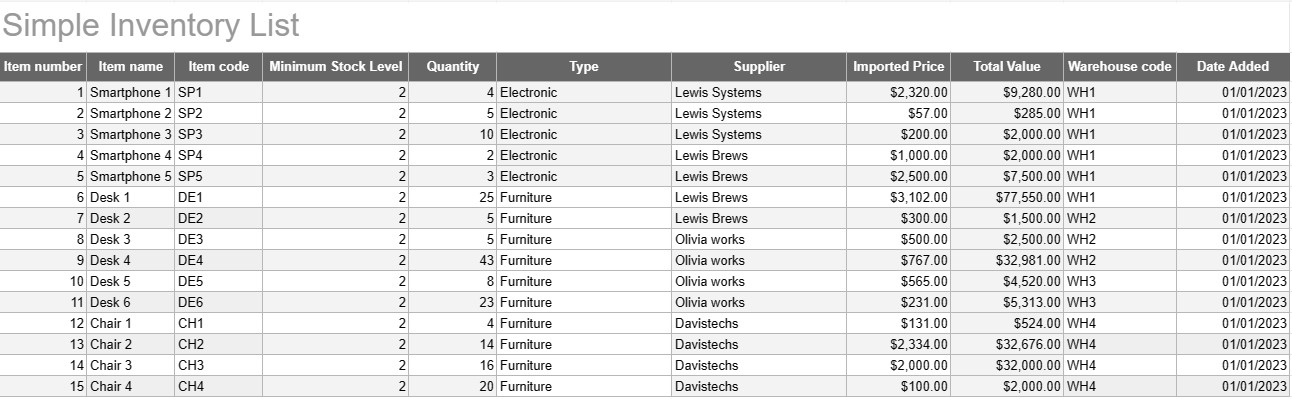
يعد قالب قائمة المخزون البسيط أداة أساسية وفعالة يستخدمها الأفراد والشركات لتتبع وإدارة مخزونهم من السلع أو المنتجات أو الأصول. يوفر هذا القالب تنسيقًا منظمًا لتسجيل تفاصيل العناصر والكميات والمواقع والمعلومات الأخرى ذات الصلة، مما يسهل مراقبة مستويات المخزون وتسهيل الإدارة الفعالة.
المكونات الرئيسية لقالب قائمة الجرد البسيط:
- تفاصيل العنصر: يتضمن القالب أعمدة أو أقسامًا لمعلومات خاصة بالعنصر، مثل اسم العنصر، والوصف، والمعرف الفريد (على سبيل المثال، SKU أو الرقم التسلسلي)، و أي ملاحظات إضافية.
- الكمية: يمكن للمستخدمين تسجيل كمية أو وحدات كل عنصر في المخزون. يعد هذا العمود ضروريًا لتتبع مستويات المخزون بدقة.
- الموقع: بالنسبة للشركات التي لديها مواقع تخزين أو مستودعات متعددة، قد يتضمن القالب عمودًا لتحديد الموقع الفعلي لكل عنصر. وهذا يساعد على تبسيط عملية الاسترجاع وإعادة التخزين.
- سعر الوحدة: يمكن للمستخدمين إدخال سعر الوحدة أو تكلفة كل عنصر. هذه المعلومات ذات قيمة لحساب القيمة الإجمالية للمخزون.
- القيمة الإجمالية: تحسب بعض النماذج القيمة الإجمالية لكل عنصر تلقائيًا بناءً على الكمية وسعر الوحدة. وهذا يوفر لمحة سريعة عن القيمة الإجمالية للمخزون.
- تاريخ الإضافة/التحديث: لتتبع التغييرات والتحديثات للمخزون، يمكن للمستخدمين تسجيل تاريخ إضافة كل عنصر أو تعديله.
- الفئة/النوع: يمكن تصنيف العناصر إلى مجموعات أو أنواع مختلفة (على سبيل المثال، الأجهزة الإلكترونية واللوازم المكتبية والملابس) لتحسين التنظيم وإعداد التقارير.
- الحد الأدنى لمستوى المخزون: يمكن للمستخدمين تحديد الحد الأدنى لمستوى المخزون لكل عنصر. عندما تنخفض الكمية إلى ما دون هذا المستوى، يكون ذلك بمثابة حافز لإعادة ترتيب العنصر أو إعادة تخزينه.
- معلومات المورد: في بيئة الأعمال، يمكن للمستخدمين تضمين تفاصيل المورد، مثل اسم المورد ومعلومات الاتصال ومعلومات إعادة الطلب.
فوائد استخدام نموذج قائمة جرد بسيط:
- تتبع المخزون: يوفر لقطة واضحة وحديثة مستويات المخزون، مما يساعد على منع نفاذ المخزون والإفراط في التخزين.
- التحكم في التكلفة: يمكّن الشركات من مراقبة قيمة مخزونها واتخاذ قرارات مستنيرة بشأن إعادة التخزين والشراء.
- الكفاءة: تعمل على تبسيط إدارة المخزون من خلال مركزية المعلومات وتسهيل الوصول إليها.
- دقة البيانات: تقلل من مخاطر الأخطاء في تتبع المخزون، حيث يتم تسجيل جميع المعلومات بشكل منهجي.
- إدارة الطلبات: تساعد في تحديد وقت إعادة طلب العناصر ومن الموردين، مما يؤدي إلى تحسين إدارة سلسلة التوريد.
- الامتثال: في بعض الصناعات، يعد الاحتفاظ بسجلات مخزون دقيقة أمرًا ضروريًا للامتثال التنظيمي وإعداد التقارير المالية.
- تحسين الموارد: يمكّن الشركات من تخصيص الموارد بشكل أكثر فعالية وتقليل تكاليف التحمل.
في الختام، يعد قالب قائمة المخزون البسيط أداة عملية للأفراد والشركات التي تتطلع إلى الاحتفاظ بسجلات منظمة ودقيقة لمخزونها. سواء تم استخدامه لمخزون منزلي صغير أو كجزء من عملية تجارية أكبر، فإن هذا القالب يبسط إدارة المخزون، ويقلل من مخاطر النقص أو الإفراط في المخزون، ويساهم في تحسين الرقابة المالية وصنع القرار.
من السهل معاينة وتنزيل قالب جدول البيانات
قم بعرض الإصدار الكامل من قالب جدول البيانات دون أي قيود لمعرفة ما إذا كان يعجبك، ثم يمكنك تنزيل قالب Excel لتخزينه على جهازك واستخدامه مجانًا.
الوصول إلى قالب جدول البيانات من أي مكان
يعمل هذا على جميع أنظمة التشغيل الشائعة مثل Windows وMacOS وLinux وiOS. يمكنك رؤية قوالب جداول البيانات وتنزيلها بدون برامج إضافية.
كيفية استخدام القالب
تعرف على كيفية معاينة قالب جدول البيانات وتنزيله ثم استخدامه باتباع الخطوات التي يسهل اتباعها للغاية
المزيد من القوالب المشابهة
شاهد المزيد من قوالب جداول البيانات الموجودة ضمن نفس الفئة مع الفئة المختارة.













